Payments
Payments are optional. SlotDesk books appointments perfectly well without ever taking money, and plenty of installs run that way.
Turn them on when you want to stop losing money to no-shows, because a deposit is the only thing in here that actually changes customer behaviour.
You do not have to use Stripe
There are two gateways, and the second one is not really a gateway:
| What it does | |
|---|---|
| Stripe | Hosted checkout, webhooks, refunds |
| Offline | You collect the money yourself and record it afterwards |
With Stripe off, deposits fall back to offline collection. Everything still works: services can still require a deposit, the amount still appears on the booking, and your team marks it paid when the cash or bank transfer arrives. What you lose is the customer being able to pay by link.
Connecting Stripe
Payments → Payment settings. This screen is Owner-only.
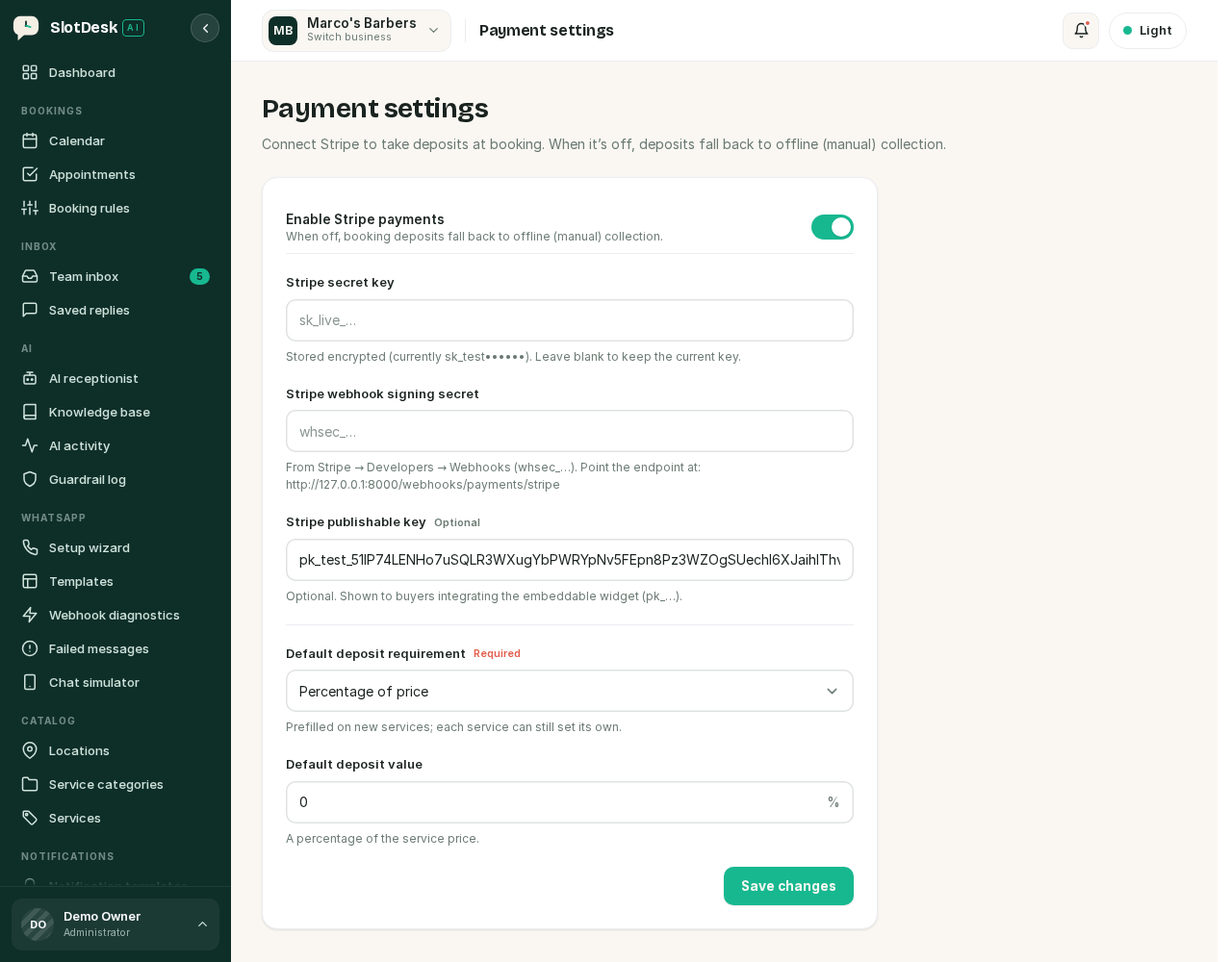 Payment settings.
| Field | Notes |
|---|---|
| Enable Stripe payments | Off means offline collection for everything |
| Stripe secret key | sk_live_… or sk_test_…. Stored encrypted; leave blank when editing to keep the current one |
| Stripe webhook signing secret | whsec_…, from Stripe → Developers → Webhooks. See below |
| Stripe publishable key | Optional, only needed for the embeddable widget |
| Test mode | On while you are using sk_test_ keys |
Turn Test mode off before going live, and change the keys at the same time. Test keys with test mode off, or live keys with it on, is the mismatch that produces payments that appear to work and never arrive.
Point Stripe at the webhook
The settings screen shows you the exact endpoint, built from your App URL:
https://your-server/webhooks/payments/stripe
Add it in Stripe → Developers → Webhooks, then copy the signing secret it gives you back into SlotDesk.
Without the webhook, customers can pay and SlotDesk will never find out. Stripe takes the money, the booking stays unpaid, and nothing reconciles. This is the payments equivalent of forgetting the queue worker.
Three behaviours that show up in Stripe's own dashboard:
- An event SlotDesk cannot match to a business returns 200, marked ignored, so Stripe stops retrying it. Events are matched by the payment link token, or failing that by the Stripe account id.
- A bad signature returns 401 and is logged. That means the signing secret is wrong.
- Event types SlotDesk does not care about are acknowledged and dropped.
Deposits
A deposit is set per service, and the business default just prefills new ones.
| Setting | Meaning |
|---|---|
| None | No deposit. The whole price is due however you normally collect it |
| Fixed amount | The same amount whatever the service costs |
| Percentage of price | A share of the service price |
Set the default under Payment settings, then override it on individual services. A £6 deposit on a £12 fringe trim and on a £120 colour is rarely what you want, which is why percentage exists.
The receptionist reads this. get_services tells it which services need a deposit and how much, and
when it books one it is told what is owed.
How a customer pays
- A booking is made that needs money.
- A payment link is created, either by the AI or by your team.
- The customer opens it, pays on Stripe's hosted page, and lands back on a confirmation.
- Stripe calls the webhook, and SlotDesk records the payment against the booking.
Payment links have their own lifecycle: pending, paid, expired or cancelled. A link is for either a deposit or the full amount.
Two rules the AI receptionist is held to, and customers will test both:
- It sends the link exactly as generated. It cannot shorten, rewrite or invent a payment URL.
- It never takes card numbers in chat. The link is the only way to pay. If a customer types their card number into WhatsApp, that is not a payment.
The ledger
Payments shows what each booking was quoted, what has been collected and what is still owed.
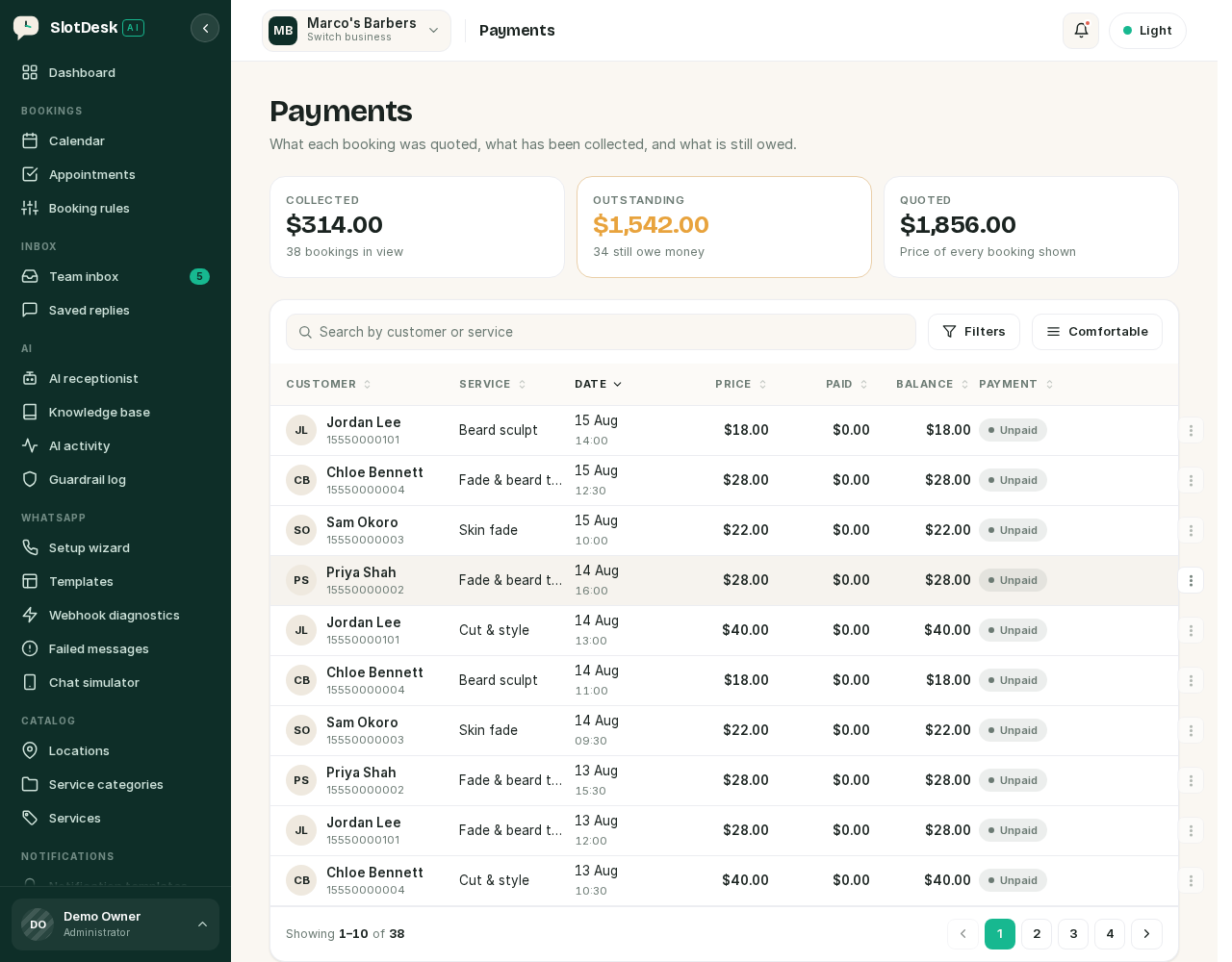 The payments ledger.
Three totals across the top: Collected, Outstanding and Quoted. Outstanding is the one to watch; it is the number a deposit policy is meant to shrink.
A booking moves along a fixed ladder:
unpaid  →  deposit paid  →  part paid  →  paid
                                         →  refunded
Marking a payment offline
For cash, a bank transfer, or a card machine in the shop: find the booking in the ledger and record the payment against it.
This needs the payments.mark-offline permission, so it is not something every team member can
do by default.
An offline payment cannot be refunded through SlotDesk. The offline gateway does not support refunds, because SlotDesk never held the money. If you need to refund cash, you refund it the way you took it and the ledger will not track that.
Refunds
Refunds need the payments.refund permission and are recorded with a reason.
Only Stripe payments can be refunded from the panel. The refund goes back through Stripe, the
transaction becomes refunded, and the booking's payment status follows.
Invoices
Every payment can produce an invoice, numbered sequentially per business:
INV-0001, INV-0002, INV-0003 …
Numbers are unique within a business, so two businesses on the same install both start at
INV-0001 rather than sharing a sequence. Download them from the ledger.
If something went wrong
A customer says they paid and the booking still shows unpaid. The webhook. Check Stripe → Developers → Webhooks for failed deliveries, then confirm the signing secret matches the one saved in SlotDesk.
Stripe shows the webhook returning 401.
The signing secret is wrong. Copy it again; it starts whsec_.
Stripe shows the webhook returning 200 but nothing happens. SlotDesk could not match the event to a business, so it acknowledged it to stop the retries. That usually means the payment was not started from this install.
Payments work in testing and not in production.
Test mode, or the keys. sk_test_ keys only ever move test money.
The AI will not send a payment link. Check the service actually requires a deposit, and that Stripe is enabled. With Stripe off there is no link to send, only an amount to collect yourself.
You cannot refund a payment. Either it was marked offline, in which case SlotDesk never held the money, or the account lacks the refund permission.
Previous: Guardrails and the knowledge base Next: Locations, categories and services, the catalog everything else is built on.