Monitoring
Six screens that answer two questions: is it working, and what is it costing.
| Screen | Where | Who can open it |
|---|---|---|
| AI activity | AI → AI activity | Admin, Owner |
| Guardrail log | AI → Guardrail log | Admin, Owner |
| Webhook diagnostics | WhatsApp → Webhook diagnostics | Admin, Owner |
| Failed messages | WhatsApp → Failed messages | Admin, Owner |
| Chat simulator | WhatsApp → Chat simulator | Admin, Owner |
| Cost dashboard | Notifications → Cost dashboard | Owner only |
Which screen answers which question
| What you are seeing | Open |
|---|---|
| Customers message and nothing comes back | Webhook diagnostics, then AI activity |
| The AI answers, but the customer never receives it | Failed messages |
| The AI answers the wrong thing, or refuses | Guardrail log, then AI activity |
| You want to try a question without a real customer | Chat simulator |
| The WhatsApp bill is a surprise | Cost dashboard |
Every one of these is downstream of the queue worker and cron. If those are not running, most of these screens are empty rather than wrong. See Cron and the queue worker.
AI activity
One row per run: one inbound message the receptionist picked up and thought about. It is a log, and nothing on it can be edited.
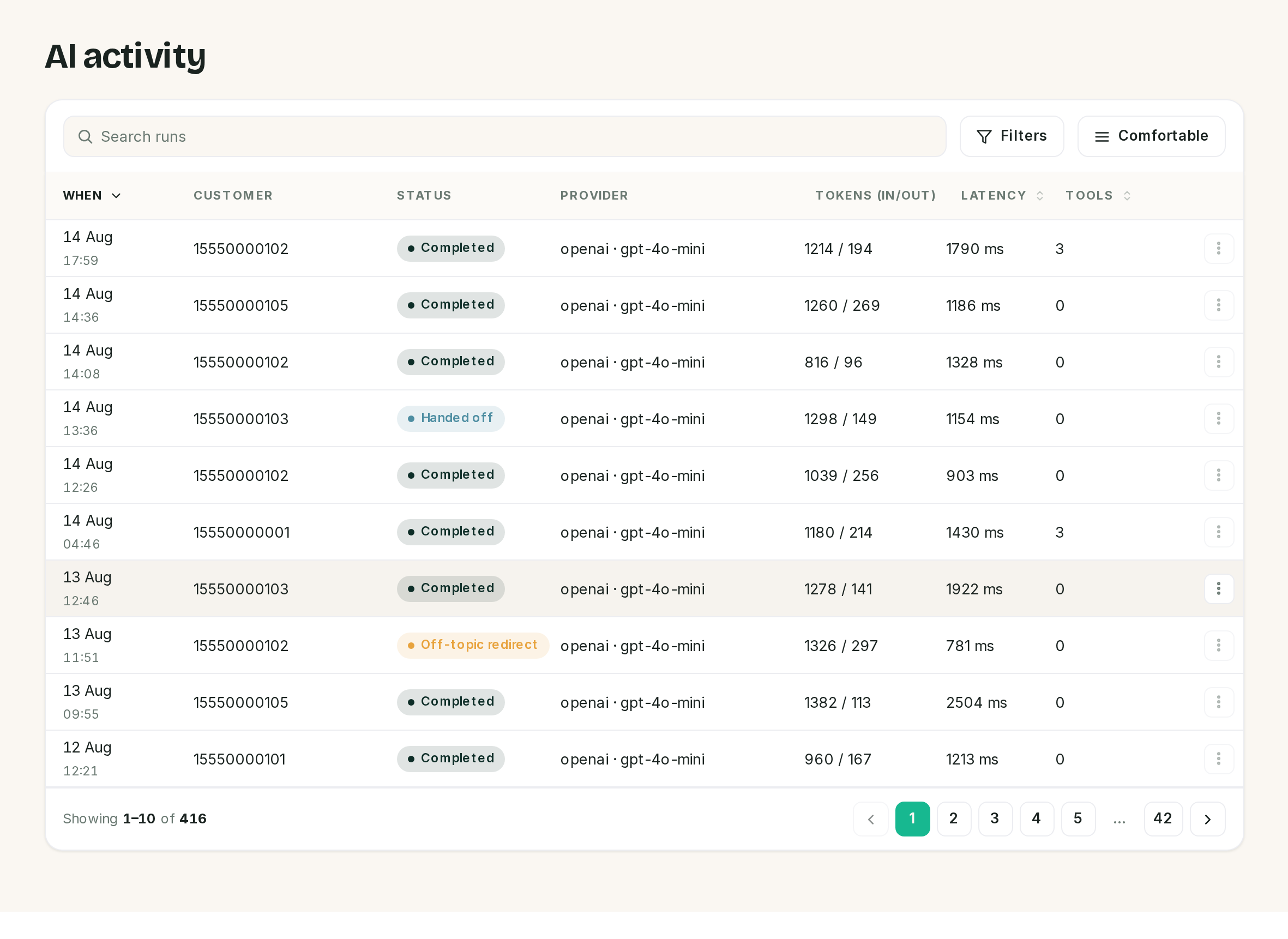 Tokens and latency are per run, not per conversation.
| Status | Means |
|---|---|
| Completed | The run finished and a reply was produced |
| Pending | Started and not finished. A wall of these means the queue stopped mid-run |
| Off-topic redirect | A guardrail caught it and the receptionist steered back |
| Handed off | It escalated to a person. The thread is in the inbox under Handoff |
| Failed | The provider errored. The reason is on the run |
Search matches the customer's number, or the text of the error. The filters are the five statuses.
The details drawer
The ⋮ at the end of a row opens Details, which is where the tool calls are.
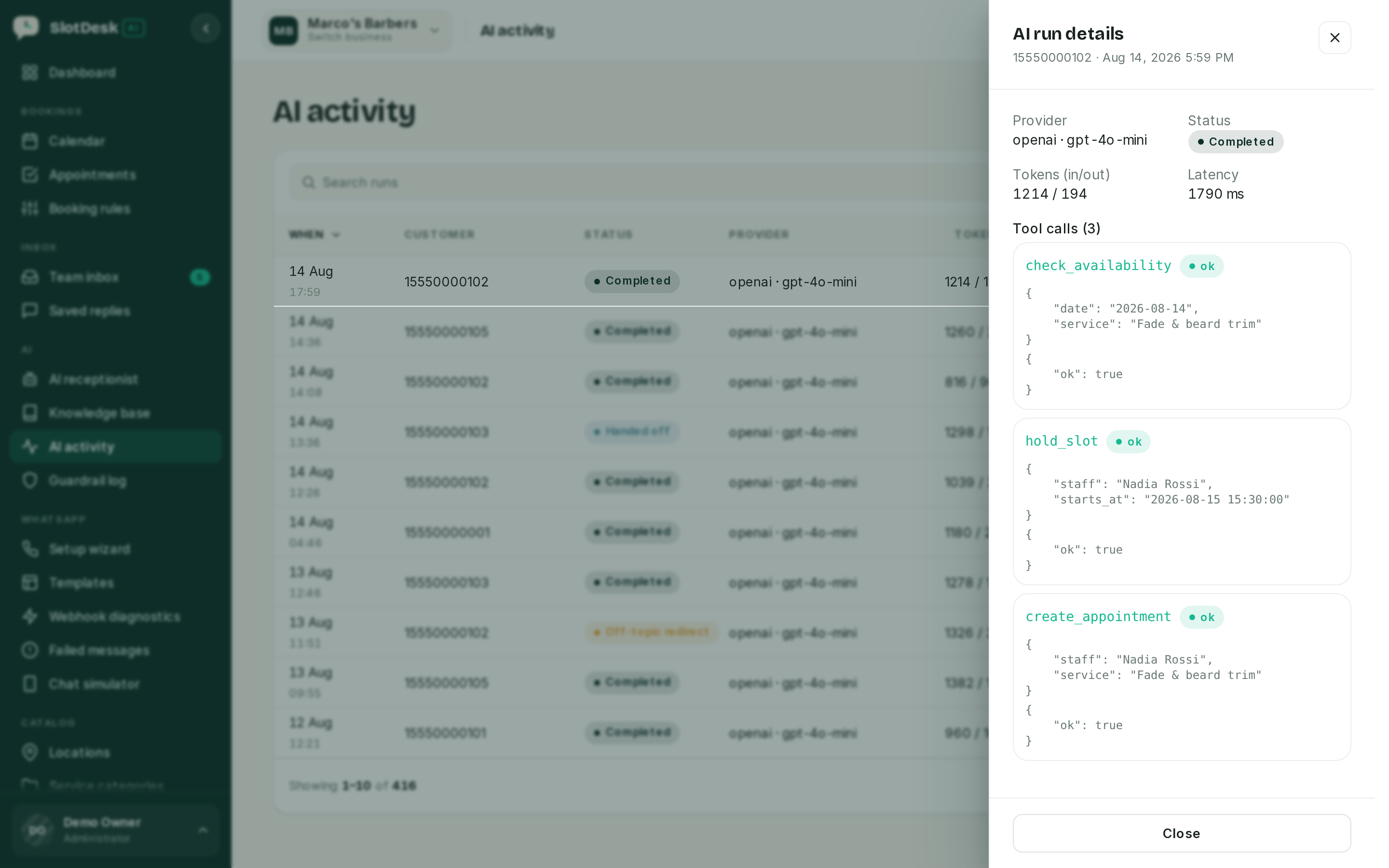 This is the receptionist showing its working: what it checked, what it held, what it booked.
A run with three tool calls that ends Completed is a booking taken end to end. A run with no tool calls answered a question. When a customer says the AI booked the wrong thing, this drawer is the evidence.
Guardrail log and Webhook diagnostics
Both are covered where they matter most rather than here.
Guardrail log records every time a guardrail fired: an off-topic redirect, a handoff keyword, a blocked topic. It is the feedback loop for tuning the receptionist, and it is in Guardrails and the knowledge base.
Webhook diagnostics shows the last 20 deliveries Meta attempted, each with a plain-English explanation: signature failed, no matching account, verified but not processed. It is the first screen to open when nothing arrives at all, and it is in WhatsApp Cloud API.
Failed messages
Outbound messages that did not get through, newest first.
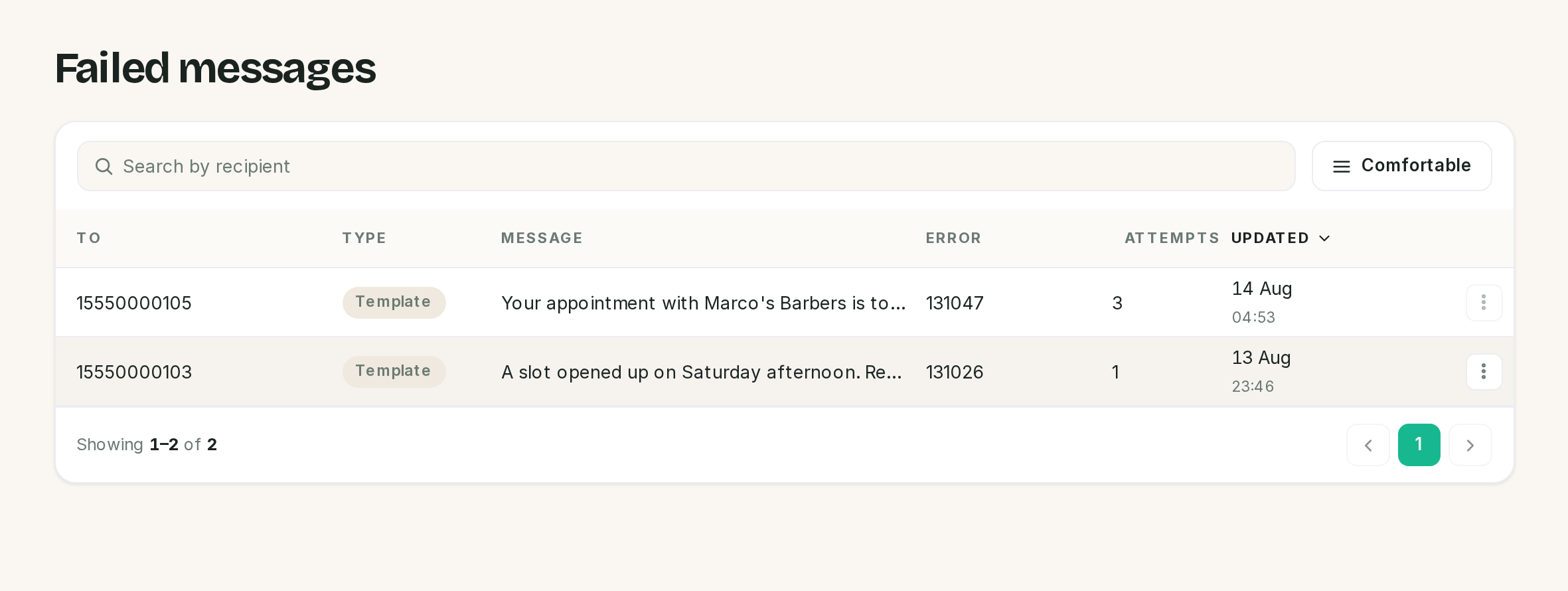 Both of these are templates, and neither can be retried.
| Column | Holds |
|---|---|
| To | The customer's WhatsApp number |
| Type | Text, Template or Interactive |
| Error | Meta's numeric error code, as returned |
| Attempts | How many retries this row has had |
Text messages retry themselves. A scheduled task runs every five minutes and re-sends failed text messages, up to three attempts, backing off 2, 4 then 8 minutes, and only while the customer's 24-hour window is open. A successful retry updates the same row rather than adding one.
⚠️ A failed template can never be retried, by the schedule or by you. Retry on the row menu refuses anything that is not free-form text, and so does the automatic task. Since templates are what get sent outside the window, and outside the window is when sends fail, the rows that pile up here are mostly the ones nothing can fix. Fix the cause, then send again from the inbox.
The coral badge next to Failed messages counts the last 7 days. A fault you fixed last month stops showing on its own, so the badge tracks what is going wrong now rather than everything that ever has. The list itself still holds the full history: nothing dismisses or deletes a row, so an older failure is still there to read, just not counted in the badge.
Chat simulator
A phone stage that feeds what you type through the real inbound pipeline, on a WhatsApp account reserved for the simulator, so you can watch the receptionist think without messaging a customer.
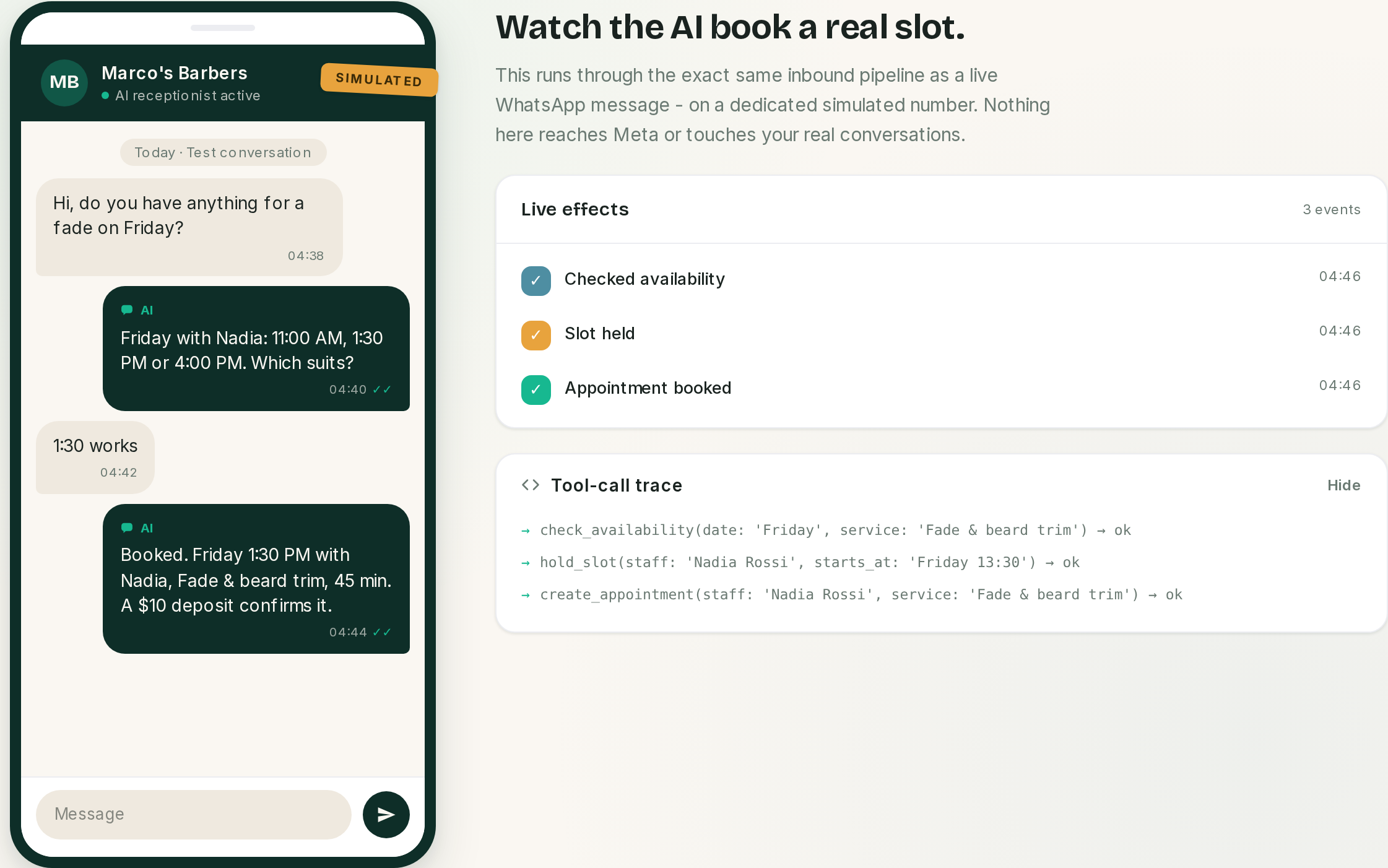 The right column is the part worth watching: what the AI decided to do, in order.
It is the best demonstration surface in the product and the safest way to test a change to the receptionist's instructions. Two things about it are not what the screen says, though.
⚠️ "Nothing here reaches Meta" is not true on a normal install. The reply comes back through the
same outbound path as any other message, which means an HTTPS call to Meta using the simulator
account's placeholder credentials. It fails, the reply is recorded as a failed message, and it lands
in Failed messages and its badge. Setting SLOTDESK_WHATSAPP_DRIVER=fake in .env stops the
call being made at all. Leave it on cloud and expect the noise.
⚠️ It is not sandboxed from your data. The simulated thread appears in the Team inbox like any other conversation, its runs are counted in AI activity and on Reports, and its messages are counted on the Cost dashboard. Only the phone number is fake. Reset conversation deletes the thread, and that is the tidy-up.
One useful side effect: the simulator runs the pipeline synchronously, so it answers even when the queue worker is stopped. That makes it a bad test of whether your queue is working, and a good test of whether your AI provider key is.
Cost dashboard
Owner only. What WhatsApp is costing, by category, with a projection to the end of the month.
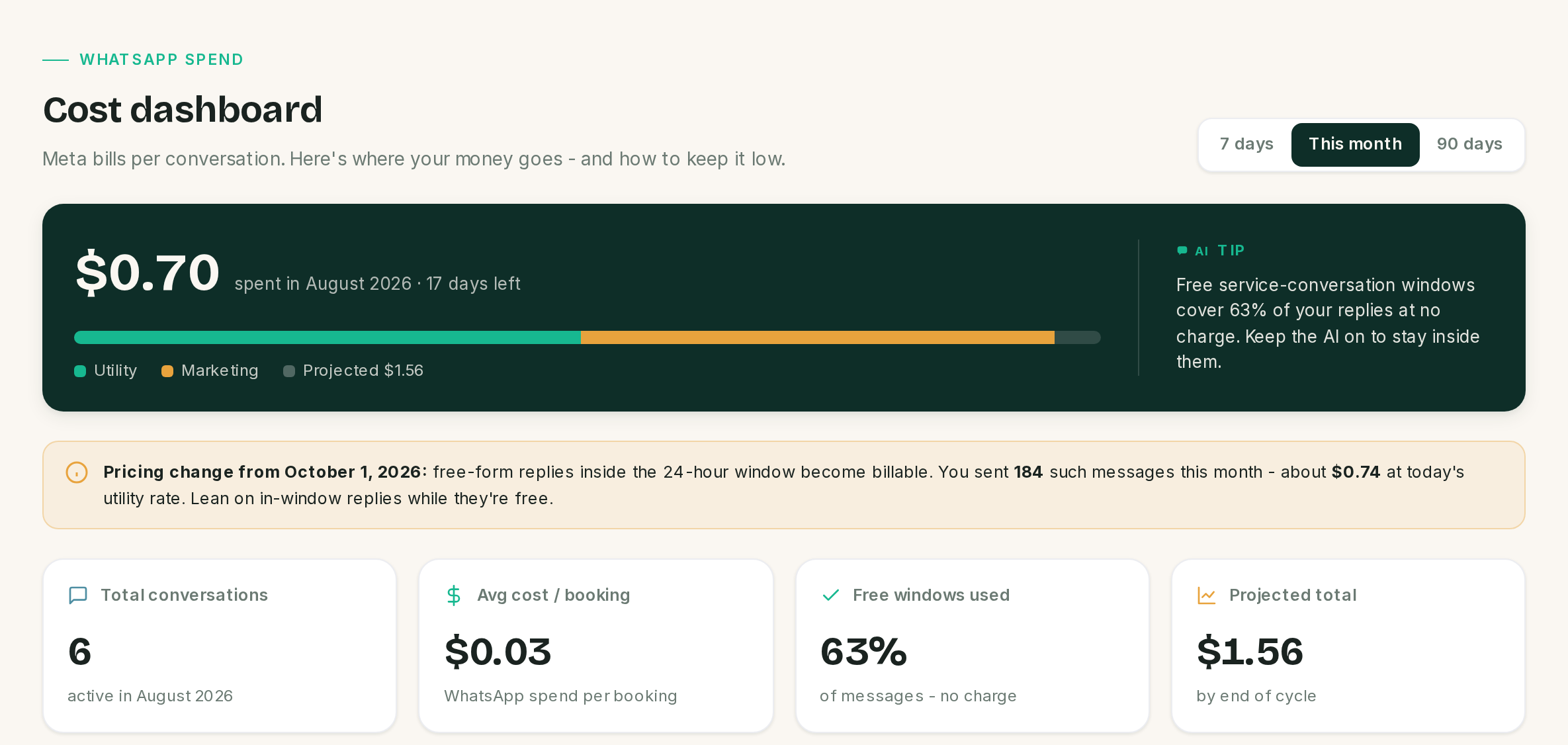 The pricing note is about a change that has not happened yet, not a charge you have had.
⚠️ Every figure on this screen is an estimate, not your Meta invoice. SlotDesk prices each
message from a rate table shipped in config/whatsapp-rates.php, which holds per-message rates for
nine country prefixes plus a fallback for everywhere else. Meta sets the real rates, changes them,
and bills per conversation rather than per message. Check the table against your own rate card, and
edit that file if it is wrong for the countries you message.
Two more things the arithmetic does, before you quote a number to anybody:
- Failed sends are still priced. A cost row is written when the message is recorded, whatever the outcome, so messages that never arrived are in the total.
- Sub-cent rates print as
$0.00. The "each" figure under a category rounds to cents, so a utility rate of four tenths of a cent reads as free while the category total is not.
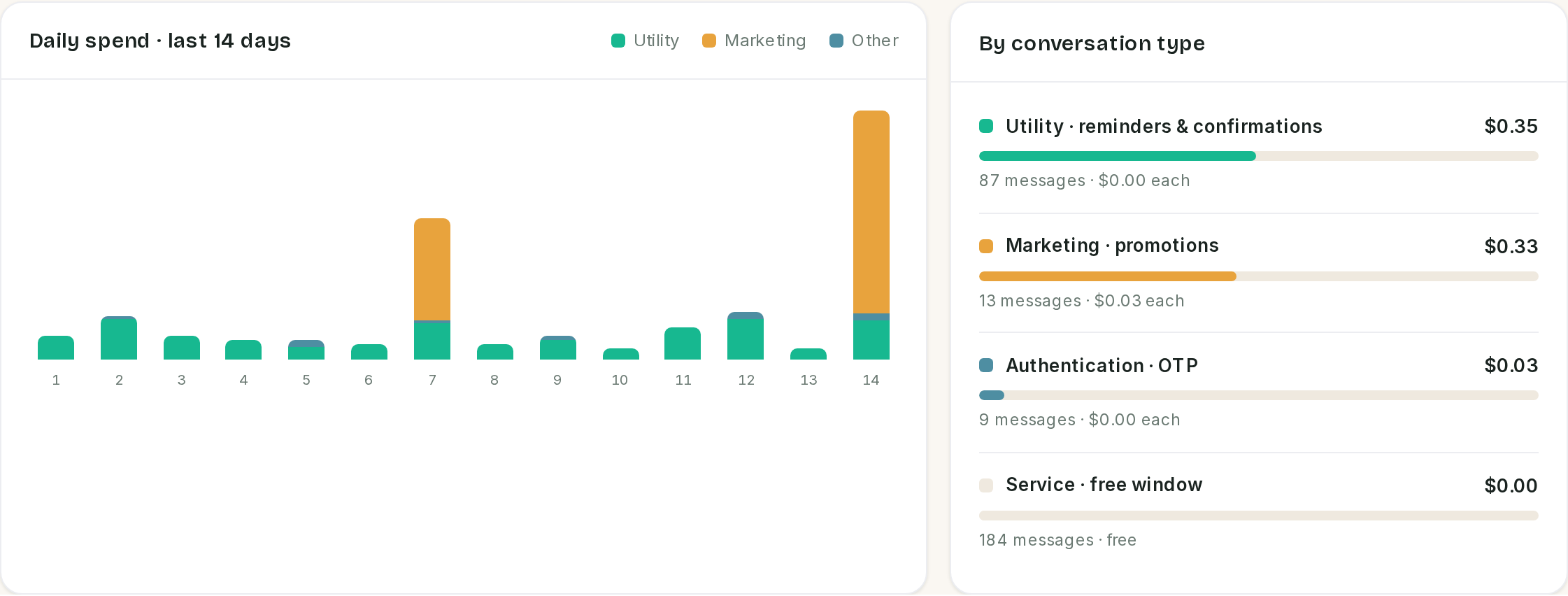 The chart is always fourteen days. The range buttons do not move it.
| Panel | Follows the range | Notes |
|---|---|---|
| Spend banner and projection | Yes | The projection is a straight line from month-to-date, so it is wild on the 1st and settles |
| Total conversations | Yes | Threads with activity in the period, the simulator included |
| Avg cost / booking | Yes | WhatsApp spend divided by every booking, including ones typed in by hand that cost nothing |
| Free windows used | No | See below |
| Daily spend chart | No | Fixed at 14 days |
| By conversation type | Yes | Utility, Marketing, Authentication, Service |
⚠️ Free windows used is only correct on This month. The number of free service messages is counted from the 1st of the month whatever range you pick, while the total it is divided by follows the range. On the same data it reads 63% for This month, 96% for 7 days and 28% for 90 days. Only the This month figure is comparing like with like.
The October 2026 note
The amber bar is a forecast, not a charge. SlotDesk ships with October 1, 2026 as the date free-form
replies inside the 24-hour service window stop being free, and the bar prices this month's service
messages at today's utility rate so you can see what that would mean. The date is hard-coded, so
check Meta's own announcement rather than treating the bar as authoritative. Until then those
messages are free and the Service line reads $0.00.
What none of these screens do
- They do not alert. Nothing emails or messages you when sends start failing, when the AI starts erroring or when spend jumps. Somebody has to look.
- They do not prune. No run, cost row or failed message is ever deleted by the app. These tables only grow.
- They do not export. There is no CSV anywhere in this group.
If something went wrong
AI activity is empty and customers are messaging. Either the webhook is not arriving, which Webhook diagnostics will show, or the queue worker is not running, or the receptionist is switched off.
Every recent run says Pending. The runs started and never finished. The queue worker stopped, or the AI provider is not answering.
Runs say Failed with a provider error. The key, the model name or your provider account. The error text on the run is the provider's own.
Failed messages keeps growing and Retry does nothing. The rows are templates. Retry only works on free-form text inside the window.
The simulator works but real customers get nothing. Expected, and diagnostic: the simulator bypasses the queue. Start the worker.
The simulator filled Failed messages with rubbish. Its replies go out through the real transport unless the fake driver is set. See above.
The cost dashboard says $0.00 and messages are definitely being sent. Cost rows are written when a message is recorded, so if the total is zero, nothing has been sent from this business yet in the period you picked.
The cost dashboard and my Meta invoice disagree. They will. The dashboard estimates per message from a local rate table; Meta bills per conversation from its own.
Previous: Customers and reports Next: The admin panel, businesses, users, health and the install settings.