Cron and the queue worker
Two lines of server configuration, and until both are in place SlotDesk will look completely normal and do nothing.
That is not an exaggeration and it is the reason this is its own chapter. The panel loads, bookings save, conversations appear. But no reminder goes out, no confirmation is sent, and the AI receptionist never replies, because every one of those runs through a queue that nothing is draining.
If you have just finished Install, do this before you connect WhatsApp. Connecting WhatsApp first means messages arrive, sit in a queue, and the symptom looks exactly like a broken WhatsApp connection.
The two lines
* * * * * cd /path/to/slotdesk && php artisan schedule:run >> /dev/null 2>&1
php artisan queue:work --tries=3
The first is a cron entry, running once a minute. The second is a process that has to stay running. They do different jobs and you need both.
| What it does | If it is missing | |
|---|---|---|
| Cron | Wakes the scheduler every minute so timed work can be queued | Reminders never become due, holds never expire |
| Queue worker | Drains the queue and actually performs the work | Nothing is sent, ever, however it was queued |
Let SlotDesk write them for you
Before you type either line by hand, open /admin. Until both are running, the dashboard shows a
Turn on background tasks banner with both commands already filled in, using the real path to
your install and the real PHP binary on your server.
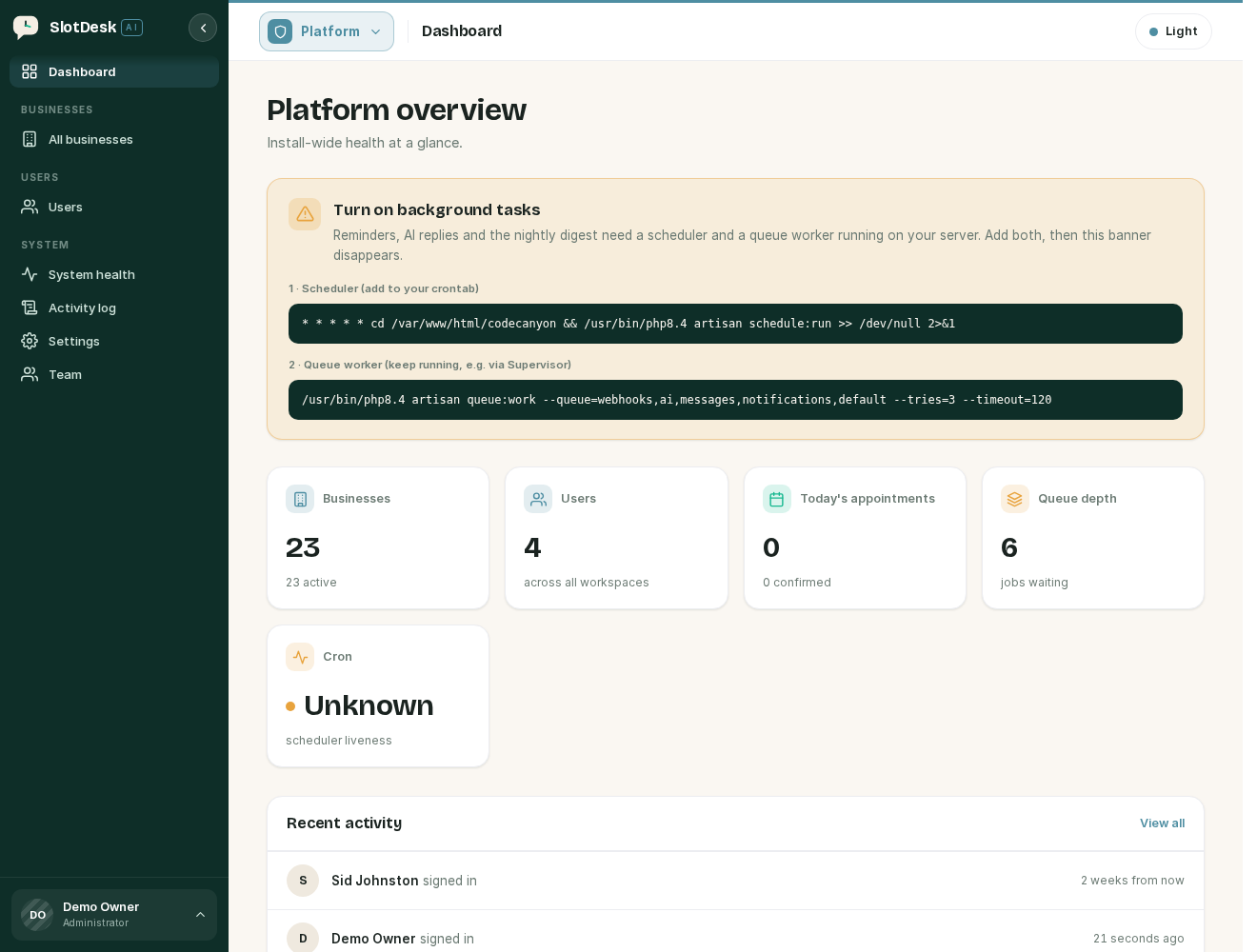 The admin dashboard, with the background tasks banner and both commands.
Copy them from there rather than from this page. It removes the two things that go wrong most often, which are the install path and which PHP the server will use.
The banner disappears once both are running, so it doubles as the check that you got it right.
The rest of this chapter explains what those two commands are and how to keep the second one alive.
1 · The scheduler
Add the cron entry with the real path to your install, replacing /path/to/slotdesk. It must point
at the folder containing artisan, not at public/.
On cPanel
Under Advanced → Cron Jobs, add a job on the "Once Per Minute" preset, or set the five fields to
* * * * *. The command is the same line above.
If cPanel gives you a full path to PHP, use it rather than the bare php. Some hosts run an older
PHP on the command line than they run for the web, and this is the most common way that bites:
* * * * * cd /home/youruser/slotdesk && /usr/local/bin/ea-php83 artisan schedule:run >> /dev/null 2>&1
On a VPS
Add it to the crontab of the user that owns the files, usually your web user rather than root:
crontab -e -u www-data
One cron entry, not several. SlotDesk does not want an entry per task. schedule:run decides
what is due each minute, and adding tasks to cron individually will run them twice.
What the scheduler actually runs
| Task | Frequency | What it does |
|---|---|---|
system:heartbeat |
every minute | Records that the scheduler ran, which is what the health page reads to tell you cron is alive |
holds:expire |
every minute | Deletes booking holds that have passed their expiry, releasing the slot |
notifications:send-due |
every minute | Queues send jobs for scheduled notifications that are now due |
messages:retry-failed |
every 5 minutes | Re-sends failed outbound WhatsApp messages, up to 3 attempts with a widening gap |
Notice that notifications:send-due queues work rather than doing it. That is the split: cron
decides what is due, the worker performs it. A reminder with cron running and no worker gets as far
as the queue and stops.
2 · The queue worker
php artisan queue:work --tries=3
--tries=3 means a job that throws is retried twice more before it is recorded as failed rather
than disappearing.
The queue runs on your database. There is no Redis to provision and nothing else to install:
jobs live in a jobs table and failures in failed_jobs. That is the default and it is the right
one for a self-hosted install of this size.
The five queues
Jobs are separated by kind so that a slow AI reply cannot delay a webhook:
webhooks,ai,messages,notifications,default
Give the worker that list in that order and it drains them in priority order, checking webhooks
first and falling to default last. This is the form the admin banner generates:
php artisan queue:work --queue=webhooks,ai,messages,notifications,default --tries=3 --timeout=120
--timeout=120 caps how long one job may run. Keep it below the 90-second retry window only if you
have shortened that window; the default pairing above is the one SlotDesk suggests.
| Queue | Carries |
|---|---|
webhooks |
Inbound WhatsApp messages and template status updates from Meta |
ai |
Receptionist replies and greetings |
notifications |
Scheduled reminders and confirmations |
default |
Anything dispatched without a queue of its own |
The order matters more than it looks. Meta retries a webhook it thinks you did not handle, so inbound messages are the thing you least want stuck behind a slow AI call.
Keeping it running
queue:work is a foreground process. Closing your SSH session ends it, and it exits on error.
Something has to restart it.
On a VPS, use Supervisor. Create /etc/supervisor/conf.d/slotdesk-worker.conf:
[program:slotdesk-worker]
command=php /path/to/slotdesk/artisan queue:work --tries=3 --queue=webhooks,ai,messages,notifications,default
directory=/path/to/slotdesk
user=www-data
autostart=true
autorestart=true
numprocs=1
redirect_stderr=true
stdout_logfile=/path/to/slotdesk/storage/logs/worker.log
stopwaitsecs=3600
Then:
sudo supervisorctl reread
sudo supervisorctl update
sudo supervisorctl start slotdesk-worker
stopwaitsecs is deliberately long so a job in flight is allowed to finish rather than being killed
mid-send.
On shared hosting you usually cannot run Supervisor. Most cPanel hosts will let you run a second cron entry that starts a worker if one is not already running. Ask your host what they support before assuming; some offer a persistent process feature, and some will run a worker for you.
Start with one worker. Add a second only if the health page shows a backlog that does not clear.
Restart the worker after every update
A worker holds your code in memory and will keep running the old version after you replace files:
php artisan queue:restart
Supervisor will start a fresh one. Skipping this after an update is a genuinely confusing bug, because the files on disk are correct and the behaviour is not.
Checking it worked
Go to System health in /admin. It probes both, so you do not have to guess.
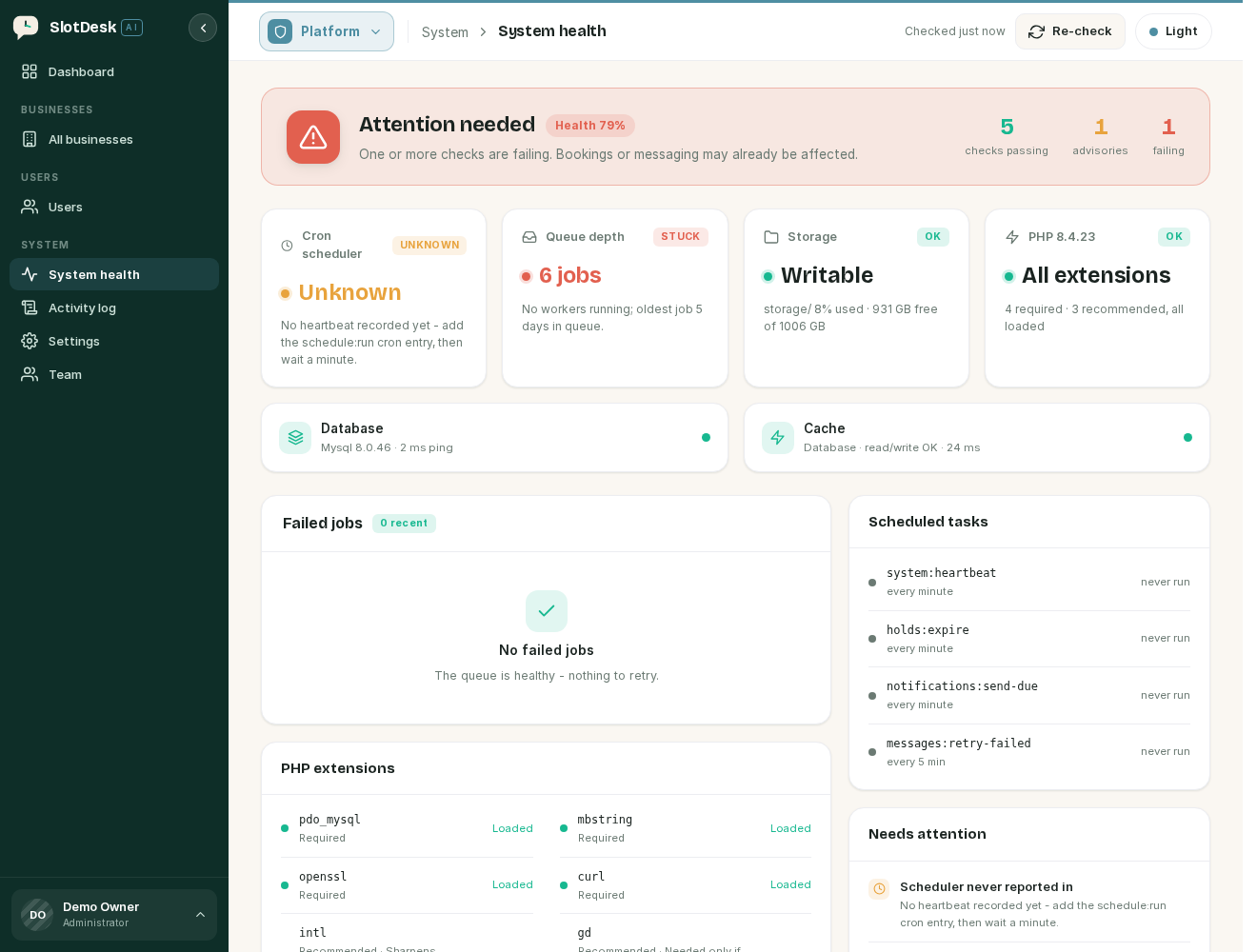 System health before cron has reported in: the scheduler is Unknown and every task reads "never run".
The Scheduled tasks panel is the useful one while you are setting this up. It lists all four tasks with when each last ran, so "never run" against every row means cron has not fired once, and a timestamp against some but not others means it is running and something else is wrong.
Cron
| It says | It means |
|---|---|
| Running | A heartbeat landed within the last 3 minutes |
| Stalled | The last heartbeat is older than 3 minutes, so cron has stopped |
| Unknown | No heartbeat has ever been recorded. Add the cron entry, then wait a minute |
Unknown does not clear instantly. The first heartbeat lands on the next whole minute after cron runs, so give it 60 seconds before deciding it failed.
Queue
The queue card shows how many jobs are waiting, how old the oldest one is, and how many worker processes are running.
| It says | It means |
|---|---|
| Nothing waiting to run | The queue is empty and drained |
| n workers processing | A worker is alive and found |
| No workers running, with jobs waiting | The stoppage this chapter exists to prevent |
A backlog of 20 or more raises an advisory, because a queue that is filling faster than it drains will not fix itself.
The worker count can read as unknown on shared hosting. It is found by inspecting the process list, and many hosts disable the PHP function that requires. If the count is blank but the queue depth keeps falling, a worker is running and the page simply cannot see it. The queue depth is the more reliable of the two signals.
Failed jobs
Anything that failed all three attempts is listed on the same health page, newest first, with the job name, its queue, when it failed and the error line.
Each has a Retry button, and there is one to retry all of them. Retrying puts the job back on the queue, so a worker has to be running for anything to happen.
Fix the cause before retrying in bulk. A batch of failures with the same error line is almost always one missing piece of configuration, and retrying them all before fixing it just fails them again.
If something went wrong
The health page says cron is Stalled, but the cron entry is there. The path is usually wrong, or the PHP binary is. Run the command by hand over SSH from the install directory. If it works there and not from cron, it is the PHP path, and cPanel's full path to PHP is what you want.
Cron runs but nothing sends. That is the worker, not cron, and it is the expected symptom of exactly this. Check the queue card for waiting jobs and no workers.
Jobs are processed twice.
Either two workers are running against the same queues, or the scheduler was added to cron more than
once. One schedule:run entry, and check the worker count on the health page.
The queue drains but WhatsApp messages still do not arrive. The queue is doing its job and the problem is further along. That is the WhatsApp Cloud API chapter.
Everything worked until an update.
The worker is running the old code. php artisan queue:restart.
Previous: Install
Next: First login and the two panels, what /app is for, what /admin is for, and who should have each.