Booking rules
Five numbers that decide when a customer can book, and how late they can change their mind.
Bookings → Booking rules, and it is Owner only. There is no per-service or per-staff override: one policy covers the business.
Who each rule actually binds
The rules do not apply to everyone equally, so read this before the settings themselves.
| Rule | Public booking page | AI receptionist | Your team in the panel |
|---|---|---|---|
| Slot granularity | Yes | Yes | No |
| Minimum notice | Yes | Yes | No |
| How far ahead | Yes | Yes | No |
| Reschedule window | Yes | Yes | No |
| Cancellation window | No | Yes | No |
Your team is deliberately unbound. Reception has to be able to book someone in for twenty minutes from now, and to cancel at any hour, or the policy becomes a reason to keep a paper diary. Everything on this screen is a customer-facing policy.
The one entry in that table that is not deliberate is the cancellation window on the booking page, and it has its own section below.
The booking window
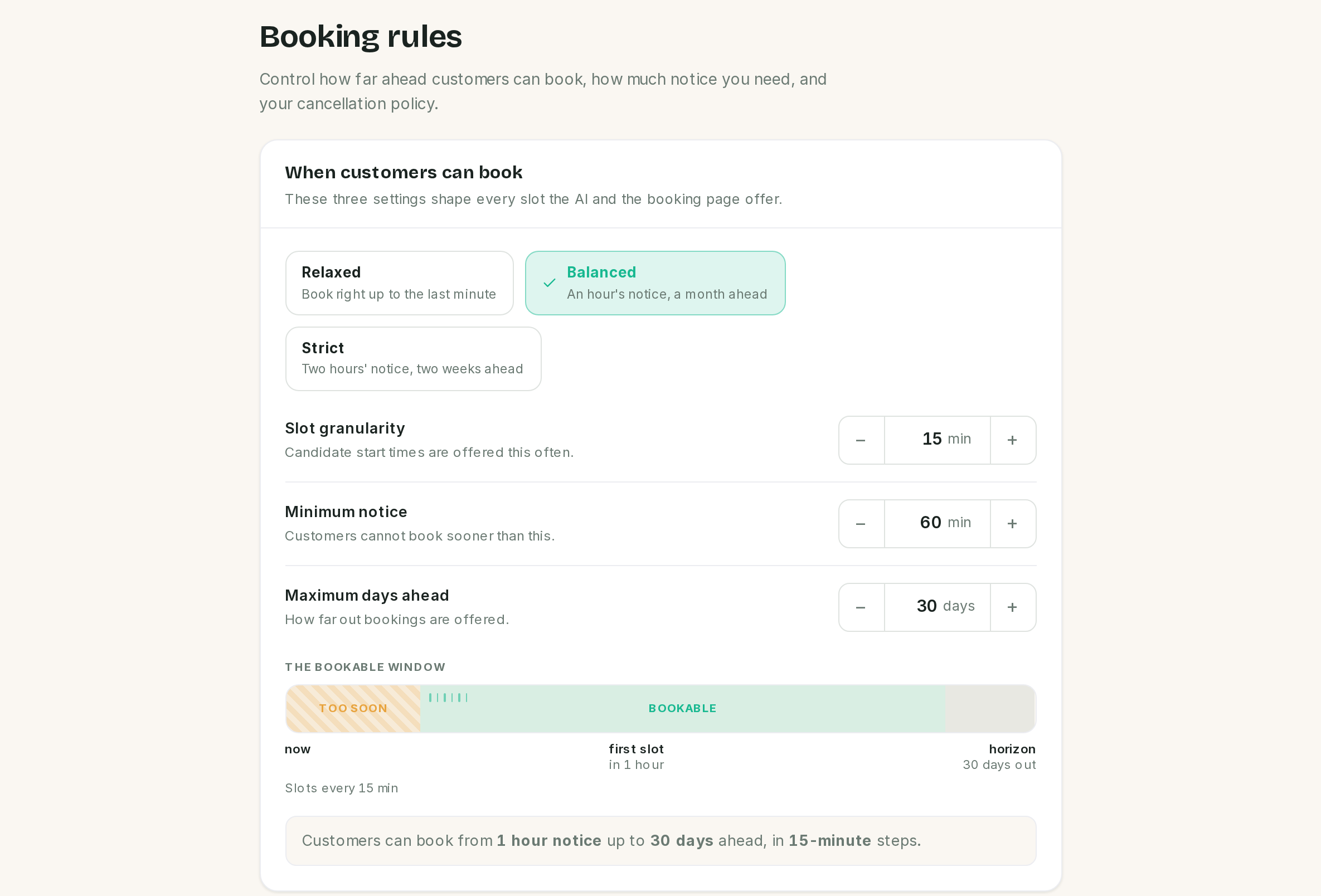 The strip is a diagram of the policy, not a scale drawing of it.
Three settings, and the presets set exactly these three.
| Setting | What it does | The stepper moves in |
|---|---|---|
| Slot granularity | How often a candidate start time is offered | 5 minutes |
| Minimum notice | How far ahead of now the first bookable slot sits | 15 minutes |
| How far ahead | The last day that can be booked | 1 day |
Granularity counts from the start of each working window, not from the top of the hour. With 15 minute slots and hours that open at 09:00 you get 09:00, 09:15, 09:30. With the same setting and hours that open at 09:10 you get 09:10, 09:25, 09:40. If your times look strange, the working hours are where they come from, not this screen.
The three presets
| Preset | Granularity | Notice | Ahead |
|---|---|---|---|
| Relaxed | 15 min | none | 60 days |
| Balanced | 15 min | 1 hour | 30 days |
| Strict | 30 min | 2 hours | 14 days |
Presets touch nothing else. Change a cancellation window and the preset still reads as whichever one those three values match; change one of the three to anything else and it reads Custom.
The two strips on the screen are diagrams rather than scale drawings. They show the shape of the policy, not the proportions of it, so do not read a gap in the strip as a length of time.
The change policy
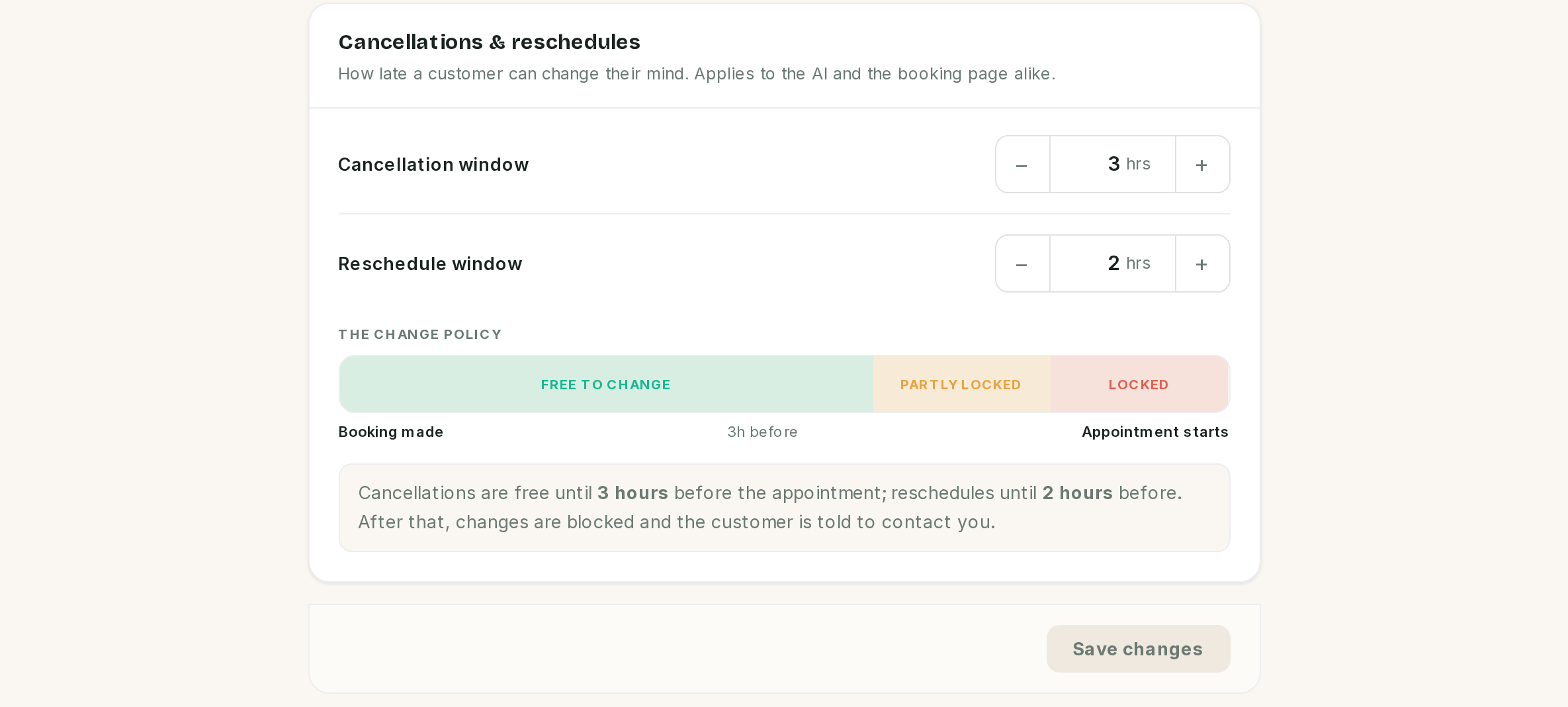 The screen says this "applies to the AI and the booking page alike". For cancellations, it does not.
Two settings, both in hours, both meaning "how long before the appointment does the door close". Zero means anytime, which is the default for both.
They are independent, not a ladder. A customer who is too late to cancel may still be inside the reschedule window, and the reverse. Set them to the same number if you want one deadline.
The cancellation window does not apply to the cancel link
⚠️ This is the one thing on this page that does not do what the screen says.
Every reminder can carry a manage link, and that link offers Cancel and Reschedule. In this release:
- Reschedule from the link is checked against the reschedule window.
- Cancel from the link is not checked against the cancellation window. It always succeeds, whatever you have set.
So a cancellation window currently stops the AI receptionist from cancelling on a customer's behalf, and stops nothing else. A customer who taps the link in their reminder can cancel ten minutes before their appointment with a 24 hour window in force.
There is no setting that closes this. Until it is fixed, treat the cancellation window as a rule the receptionist follows rather than one the product enforces, and take deposits if you need last-minute cancellations to cost something. Deposits are covered in Payments.
Double-booking protection, and where it stops
For anything booked through the booking page or the receptionist, a slot is taken once:
- The check covers the buffered footprint, not just the appointment, so two bookings cannot overlap each other's clearance.
- It is per staff member. Two people can be booked at the same time as each other, which is the point of having two chairs.
- The row is locked for the duration of the write, so two customers pressing confirm at the same moment cannot both win.
- While the receptionist is confirming details, it places a hold on the slot for 10 minutes. Held slots are not offered to anyone else, and expired holds are swept every minute by the scheduler. The ten minutes is fixed and not on this screen.
Booking by hand in the panel is checked too. The Appointments form runs the same clash check against the buffered footprint, and refuses to save when the slot is taken, naming the booking it collides with.
When you genuinely mean to double-book, tick Book anyway on the form and it saves. That is the receptionist squeezing someone in, and it is a deliberate action rather than an accident.
Two rules the panel still does not apply, on purpose: it will let you book outside working hours and inside the minimum-notice window. Someone standing at the counter is exactly the case those two rules are not meant to block.
A booking typed into the panel sends the same messages as one from the booking page or the receptionist: confirmation first, then the reminders. See Notifications and reminders.
Saving
Edits are held until you press save, and Discard puts back what is stored. Nothing is applied to existing appointments: the rules are evaluated when a booking is made or changed, so tightening the notice does not disturb tomorrow's diary.
If something went wrong
There are no bookable slots at all. Minimum notice first, then working hours, then whether the service has active staff. A two hour notice on a business that closes at 17:00 means nothing is bookable after 15:00.
Slots are offered at 09:10, 09:25, 09:40. Granularity counts from the start of the working window. Change the working hours, not this screen.
Customers still cancel at the last minute. The cancel link does not honour the window. See above.
A staff member says the policy is blocking them. It is not. Nothing on this screen applies inside the panel; look for a different cause, such as the appointment already being cancelled.
Two appointments are on the same person at the same time. One of them was typed into the panel by hand. The booking page and the receptionist cannot produce that.
A customer says they got no confirmation. Check how the booking was made. Bookings entered by hand in the panel schedule no notifications at all.
Changing the rules did nothing to existing bookings. Correct. They apply to new bookings and to changes, not retrospectively.
Previous: Staff and team members Next: Notifications and reminders, what gets sent and when.