The admin panel
/admin owns the whole install: every business on it, every account, and the settings that sit above
all of them. It is a different panel from /app, not a deeper level of it, and only an account
flagged as a super admin can open it.
If you are the only business on this install, you will spend most of your time in /app and visit
here for four things: health, accounts, the audit trail and the install-wide defaults. Which panel is
which, and how to move between them, is in
First login and the two panels.
Businesses
Every workspace on the install, with the piece of each one that matters most: the slug.
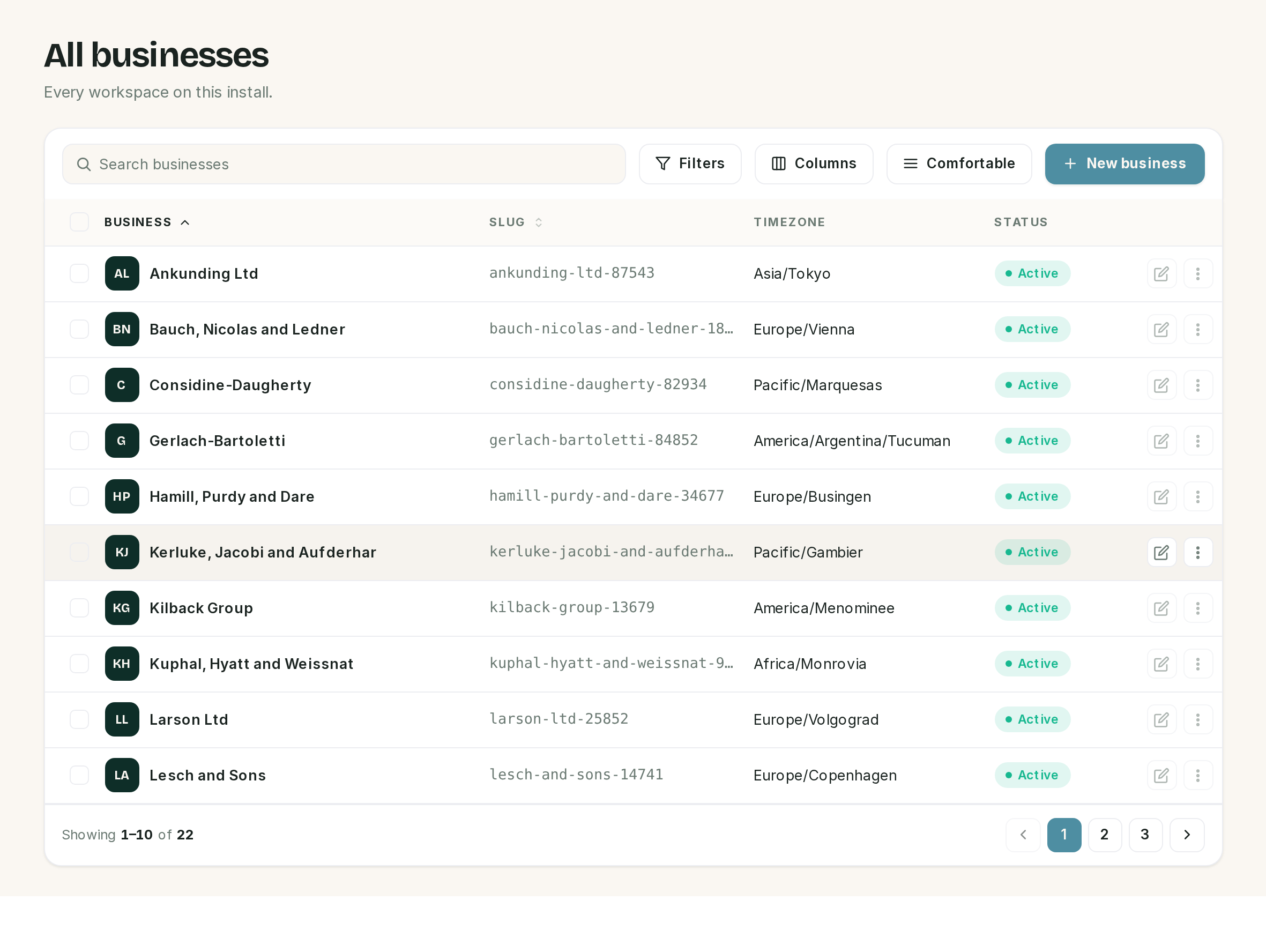 The slug column is the URL. It is generated from the name once and then left alone.
| Column | Holds |
|---|---|
| Business | The display name, used everywhere a customer sees the business |
| Slug | The URL segment: /app/<slug> for the panel, /<slug> for the public booking page |
| Timezone | Every availability rule, reminder and booking window for that business |
| Status | Active or Inactive |
⚠️ Renaming a business does not change its slug. They are two fields and only the name is cosmetic. An install where a business was renamed after setup will show one name in the panel and a different word in the URL forever, which is confusing but harmless. Change the slug deliberately if you want them to match, and remember that every booking link you have shared already points at the old one.
Inactive is not a kill switch. An inactive business stops serving its public booking page, which returns not-found. The panel still opens, WhatsApp still arrives, and the receptionist still answers. Use it to take a business off the internet, not to freeze it.
The row menu has Enter panel, which is the supported way for a super admin to open somebody else's workspace. It is written to the audit trail as "entered panel as", so the crossing is on the record.
⚠️ Deleting a business deletes everything in it. Appointments, customers, conversations, messages, templates, payments: more than thirty tables cascade. There is no export first and no undo.
Users
Every account on the install, whichever businesses they belong to. Filters split super admins from everybody else.
A user record has a name, an email, a password, the super admin flag, and a list of business access rows, each pairing a business with a role. That list is the whole permission model: a person with no rows can sign in and see nothing, and a person with three rows is three different roles depending on which panel they are in. Roles themselves are in First login and the two panels.
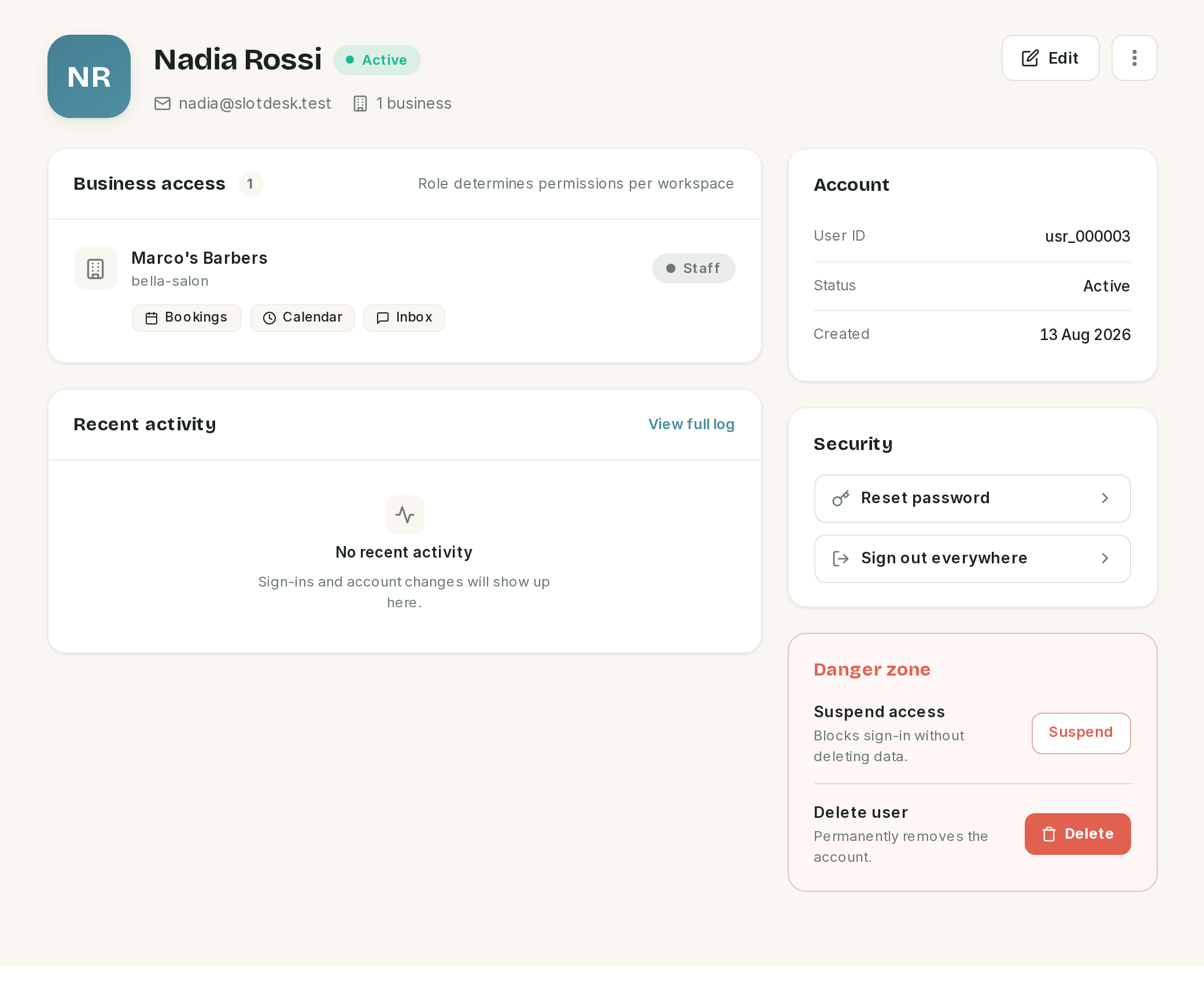 The business shows its name and its slug together, which is the clearest place to see the two.
The actions down the right are the reason to come here.
| Action | What it does |
|---|---|
| Reset password | Emails a reset link. It does not set a password for them |
| Sign out everywhere | Deletes that account's sessions. They are signed out on every device |
| Suspend | Blocks sign-in. Nothing is deleted, and the record keeps its access rows |
| Delete | Removes the account permanently |
⚠️ Suspending checks at sign-in, so an open session survives it. Somebody already logged in stays logged in until their session ends. To remove access now, suspend and sign out everywhere.
⚠️ Password reset needs working email. A fresh install writes mail to the log file instead of sending it, so the link never arrives until SMTP is configured. See Before you start.
You cannot suspend or delete your own account, which is deliberate: it stops the last super admin locking the install.
System health
The screen to open when somebody says "it has stopped working". One banner, four runtime cards, two service probes, the scheduled tasks and the failed-job list.
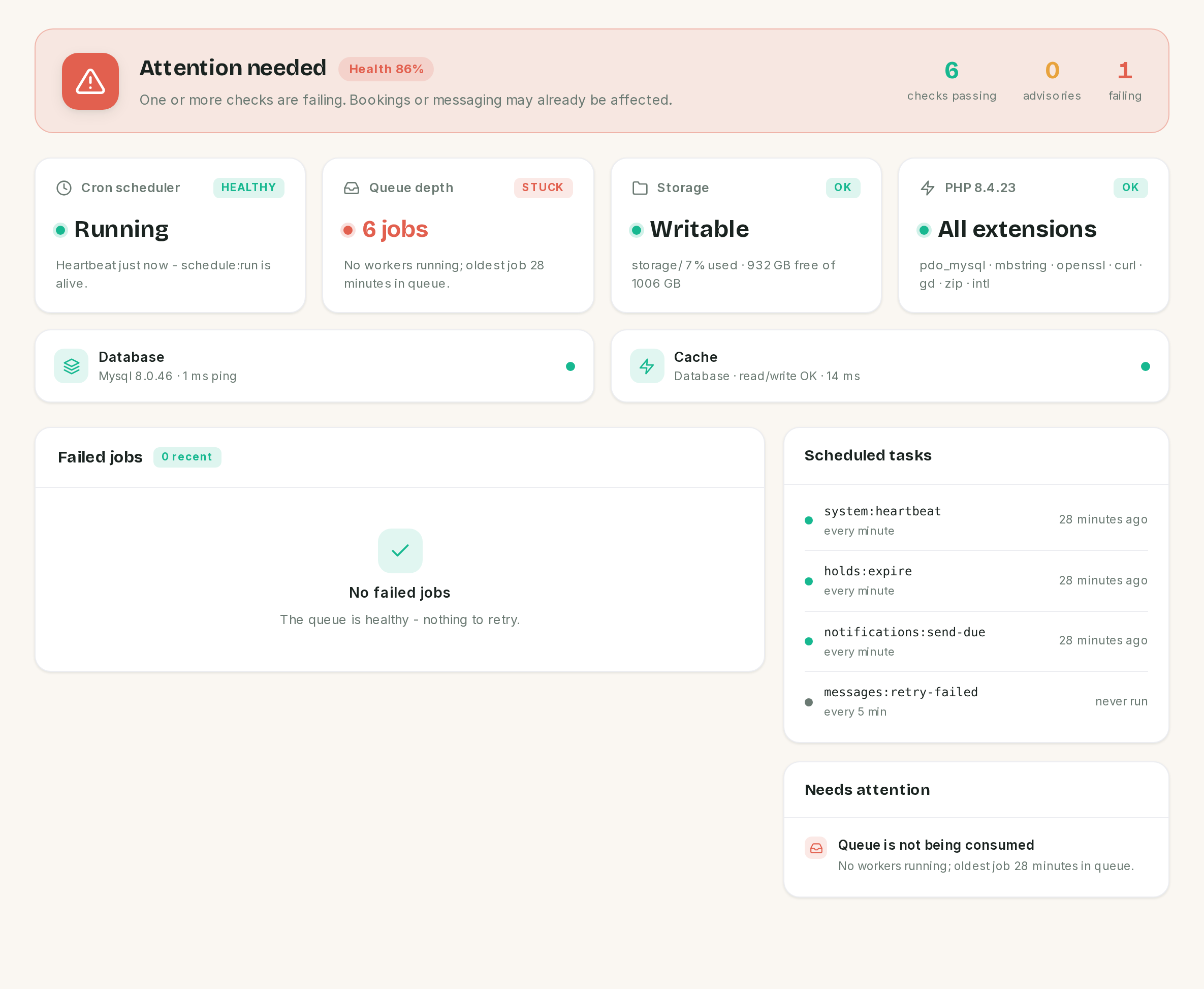 A real half-configured install: cron is alive, nothing is consuming the queue.
| Card | Reads healthy when |
|---|---|
| Cron scheduler | A heartbeat arrived in the last 3 minutes. Older than that is Stalled; none ever is Unknown |
| Queue depth | Nothing is waiting. 20 or more jobs is a backlog; anything waiting with no worker is Stuck |
| Storage | storage/ accepts a write. Above 90% disk is an advisory |
| PHP | All seven required extensions are loaded |
Below them, Database and Cache are live probes with their ping time, Scheduled tasks lists the four commands with when each last ran, and Failed jobs shows the last ten with Retry and Retry all.
The banner rolls all of it into one verdict and a percentage, where an advisory counts as half a pass. The figure above scores 86% and still says Attention needed, because one check is failing: the verdict is driven by the worst state, not by the score.
⚠️ Failed jobs here are not Failed messages. This card is Laravel's queue: jobs that threw an exception, which Retry re-queues. Messages WhatsApp refused are a different screen with a different retry, in Monitoring.
⚠️ The worker count needs exec(). On shared hosting where PHP disables it, SlotDesk cannot see
whether a worker is running, so a backlog reads as a backlog rather than as a stoppage. Cron and the
queue are two separate things to check, and
Cron and the queue worker covers both.
Platform settings
The defaults that sit above every business.
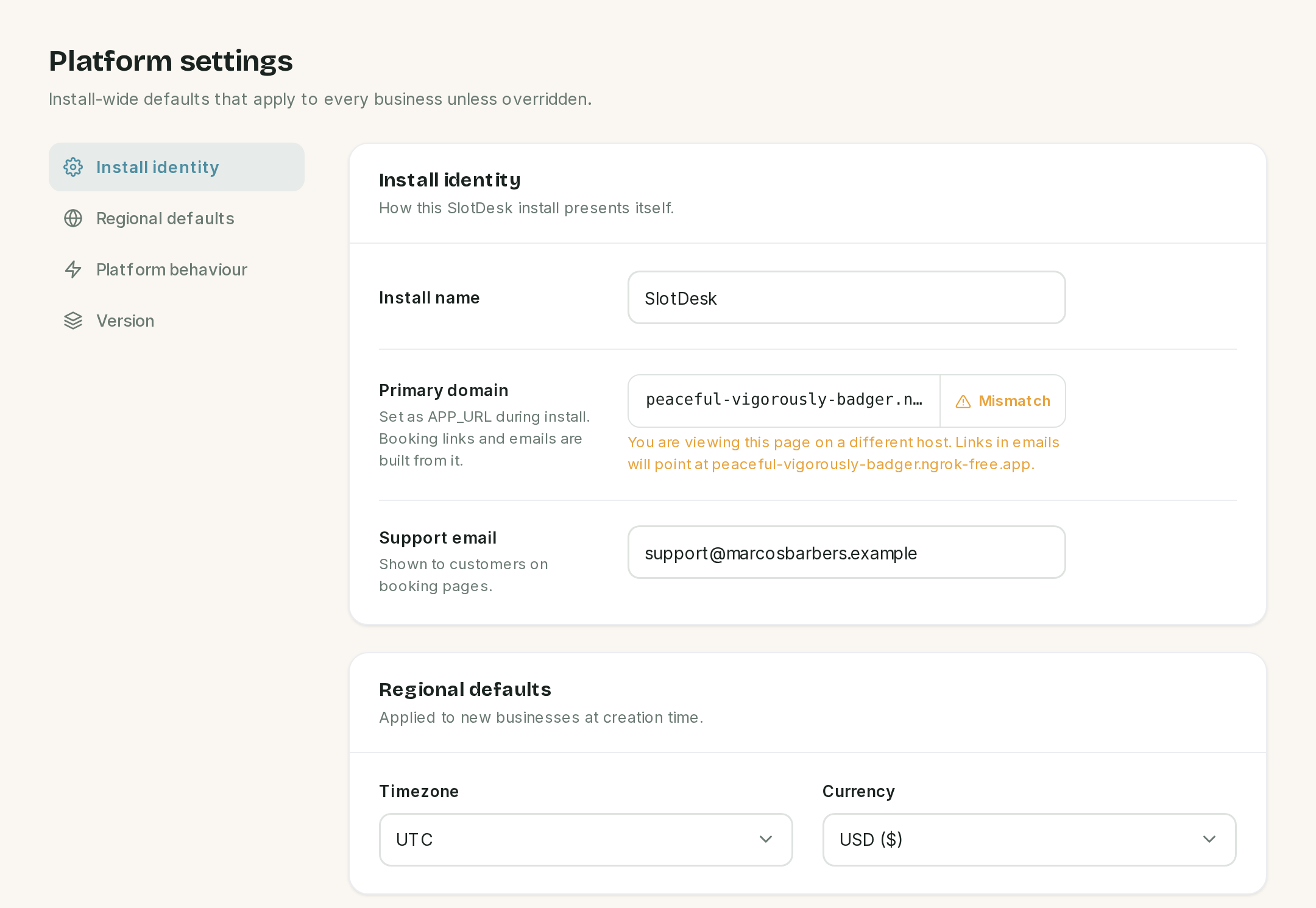 The domain mismatch here is a tunnel used for testing. On a normal install both hosts are the same.
| Setting | Effect |
|---|---|
| Install name | What the install calls itself. Saving also rewrites APP_NAME in .env |
| Primary domain | Read from APP_URL. Booking links and email links are built from it |
| Support email | Shown to customers on booking pages |
| Timezone and Currency | Applied to new businesses when they are created |
| Maintenance mode | Covered below |
| Version | The release running, next to the version the last completed update recorded |
⚠️ The regional defaults are prefills, not policy. Changing them here does nothing to a business that already exists. Each business carries its own timezone and currency, and those are the ones that govern its bookings.
Read the primary domain check. If the host you are viewing on differs from the configured one, the screen says so, because that is the state where booking links in outgoing emails point somewhere the customer cannot reach.
⚠️ Maintenance mode only closes the public booking page. Customers get a maintenance page instead of the booking form, and the API answers 503. The panels keep working, WhatsApp keeps arriving and the receptionist keeps answering, so it is not a way to pause the product.
The version card is an update check, not a badge. The two numbers differ when files were replaced but migrations did not finish, which is exactly the state to catch after an upgrade. See Updating and backups.
Activity log
Every audited action across every business, newest first, with a CSV export of whatever the filters are showing. It is the only CSV in the product; the other export is the per-customer data file on Customers and reports.
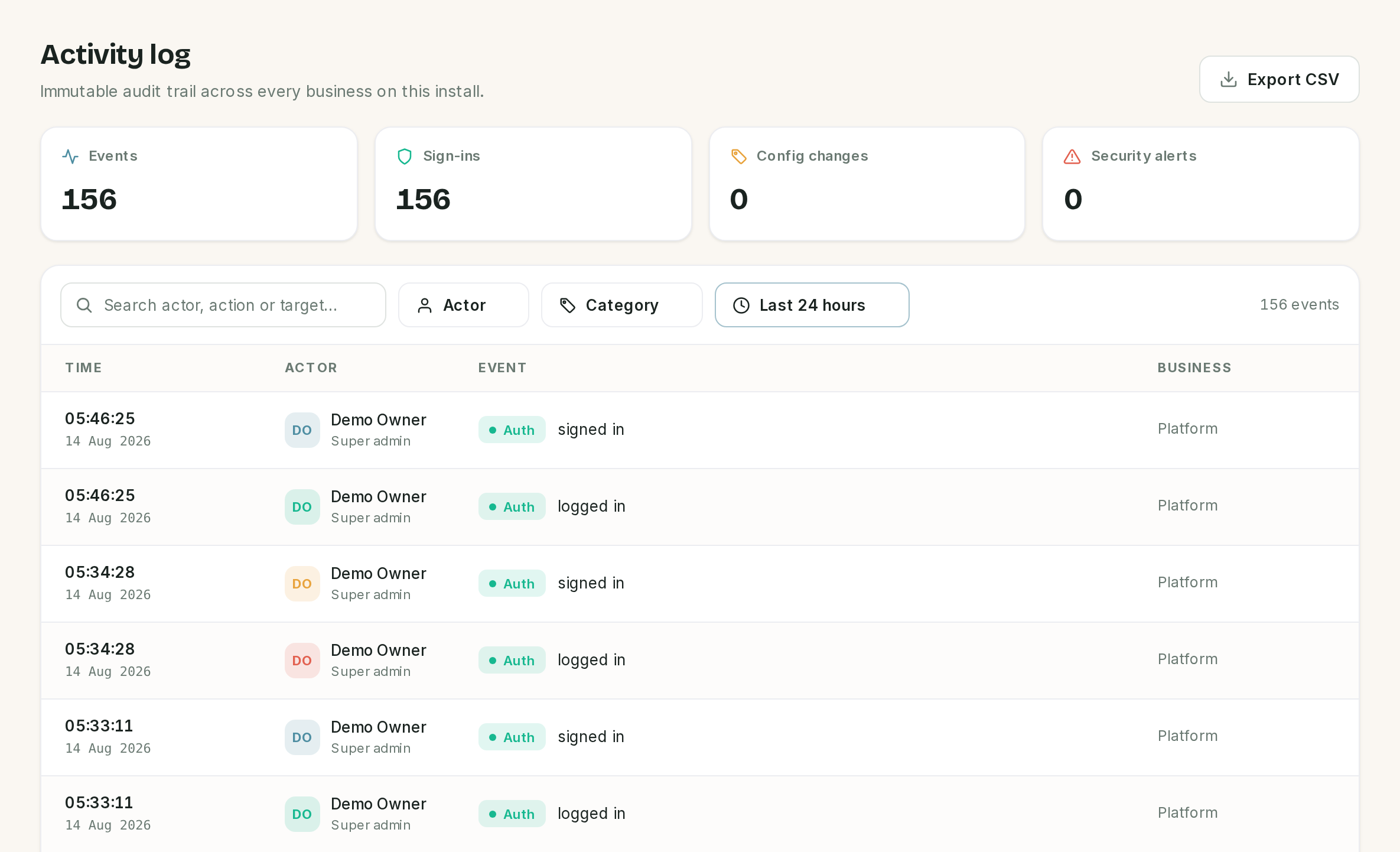 Every row on this install is a sign-in, because that is all this install has done today.
Filter by actor, by category (the categories offered are only the ones actually present) and by time window. The Business column reads Platform for anything install-wide, such as signing in or changing a user.
A sign-in writes one row, worded "signed in", and a sign-out writes one worded "signed out". Both come from a listener on Laravel's own auth events, so the counters at the top match the number of events rather than double-counting them.
The actor colour is decorative, and it comes from the row's position rather than from the person, so the same account is a different colour on the next page. Do not read it as a code.
Team
A read-only roster of everybody on the install, grouped into super admins, business owners and members, with a count of suspended accounts. It answers "who has access to this thing" in one screen. Changing any of it happens under Users.
⚠️ There are two Team screens and they are different. This one is the install. Team inside a business is that business's logins, and Staff is who performs services, which is a third thing again. See Staff and team members.
If something went wrong
/admin returns 404.
The account is not a super admin. Check it under Users from an account that can already get in.
A business's URL does not match its name. Expected. The slug is generated once from the name and never follows a rename.
A suspended user is still using the panel. Suspension is checked at sign-in. Sign them out everywhere as well.
Nobody received the password reset email. Email is written to the log until SMTP is configured.
Health says the queue is stuck but the site works. The queue only carries background work: messages, reminders, AI replies. Pages keep serving while it is stopped, which is why this can go unnoticed for days.
Health cannot tell me whether a worker is running.
exec() is disabled on the host. Check from the server directly.
Maintenance mode is on and staff can still book. It only closes the public booking page. The panel is unaffected.
An action in the activity log appears twice. It should not: every event, sign-ins included, is recorded once. Check whether the two rows are genuinely the same event rather than, say, a sign-in and a sign-out a moment apart.
Previous: Monitoring Next: Troubleshooting, symptom first: nothing sends, the webhook will not verify, the AI is silent.