Customers and reports
Two screens that look backwards: who you have talked to, and what the business did.
People → Customers is open to everyone with access to the business. Insights → Reports needs an Admin or Owner login.
One row per WhatsApp number
A customer record is a phone number with a name attached, and the number is the identity. Two numbers for the same person are two customers, and there is no merge.
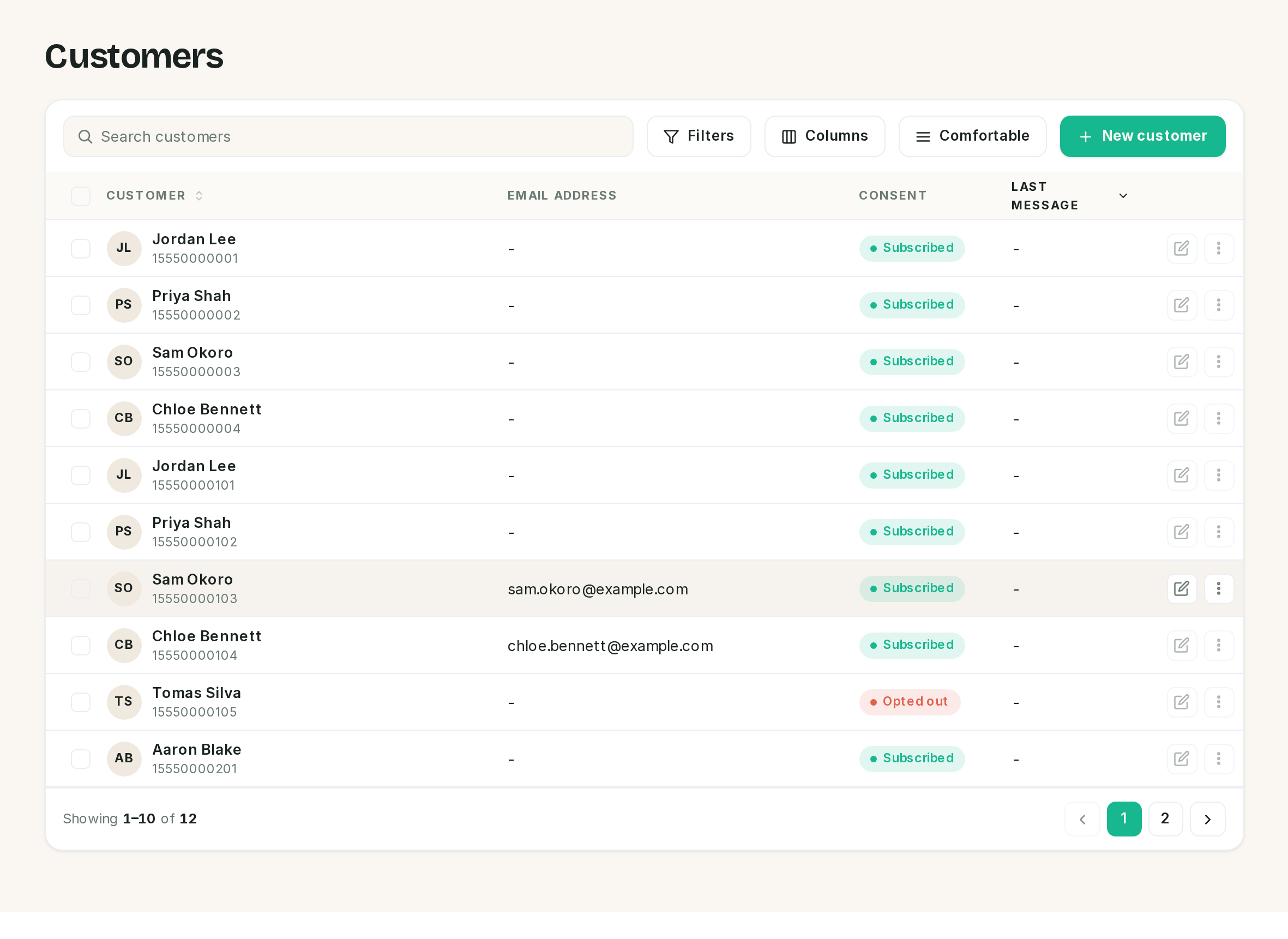 Two rows here are the same person on a second number. That is the model, not a fault in the data.
| Column | Holds |
|---|---|
| Customer | The name, with the WhatsApp number under it |
| Email address | Only ever what the booking page collected, or what you typed |
| Consent | Subscribed or Opted out. Read-only |
| Last message | Empty. See below |
Columns adds Created and Updated, which are hidden to begin with. Search matches name, number and email. Filters offers the two consent states.
⚠️ The Last message column is always empty, and it is what the list sorts by. SlotDesk records the time of the last message on the conversation, not on the customer, so this column has nothing to show and the default ordering is arbitrary. Sort by Customer, or add Created under Columns and sort by that.
The public booking page asks for an email address and stores it when it creates the customer, and only then. The receptionist never asks for one, and a returning customer who types a new address on the booking page is ignored, because the record already exists. Most rows will have a dash here for a long time.
The record
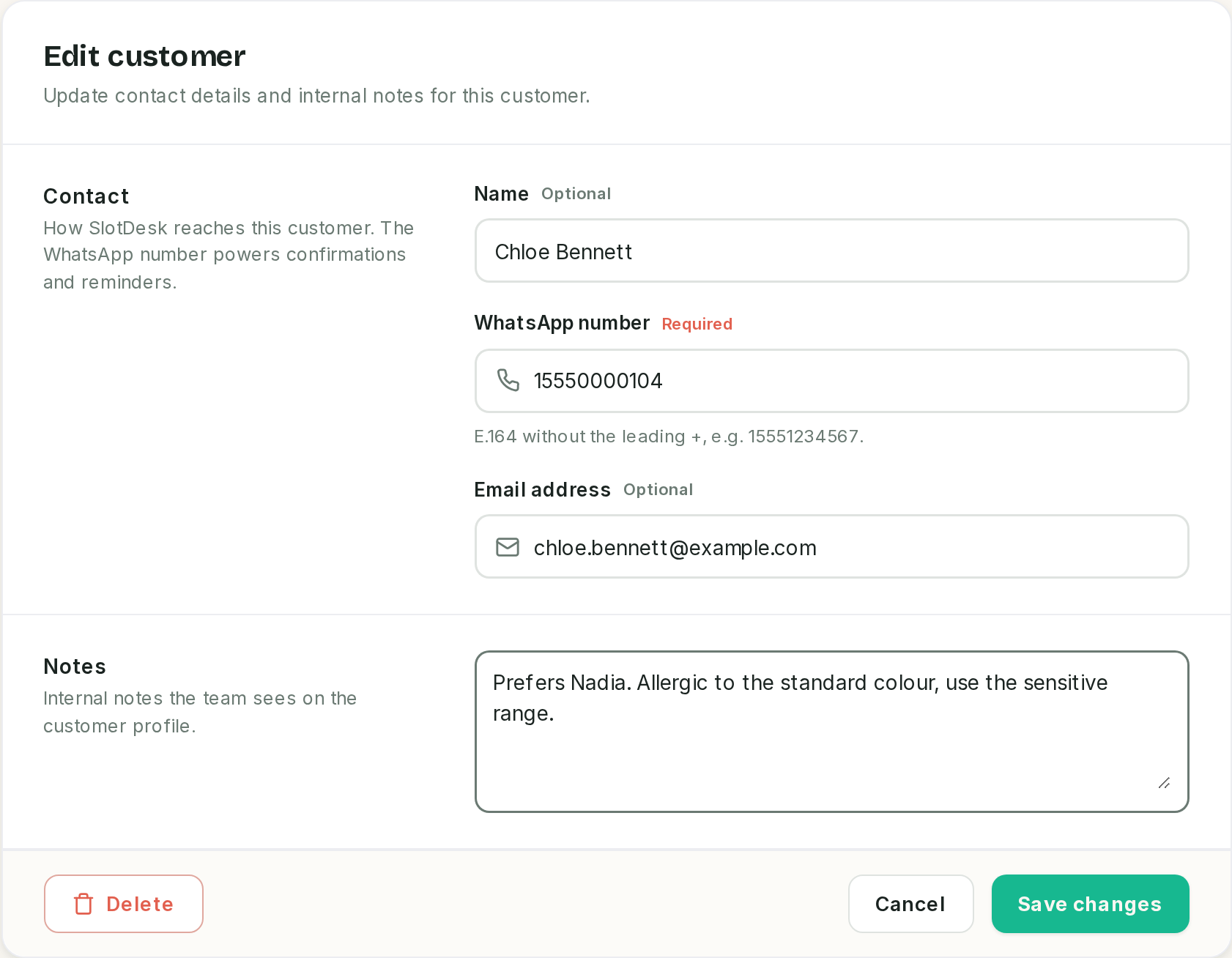 Notes are internal. The customer never sees them, and neither does the receptionist.
Four fields, and only the number is required. It is stored in E.164 without the leading plus, which the field says under itself.
⚠️ Saving a number that already exists returns a 500 error page, not a validation message. The form does not check for duplicates and the database does, so the collision surfaces as a server error over the form. Nothing is saved. Search for the number first.
⚠️ The Delete button on this form does nothing. It is a known defect: the confirmation never binds, so the click is swallowed. Delete from the list instead, where it works.
Consent belongs to the customer, not to you
The Consent pill is derived, and there is no control for it anywhere in the panel.
A customer opts out by sending stop, unsubscribe or cancel subscription over WhatsApp. That writes the opt-out date on their record and the pill turns coral.
| Once opted out | Behaviour |
|---|---|
| Scheduled confirmations and reminders | Skipped, and recorded as skipped |
| The AI receptionist | Does not answer them at all |
| Template sends | Refused |
| A person replying from the team inbox | Still allowed, inside the 24-hour window |
⚠️ Nothing in the panel can opt a customer out, and nothing can put them back. A customer who asks your receptionist in the chair to stop the reminders cannot be recorded here, and one who typed stop by mistake cannot be restored. The only routes back are the database or a new record on a new number.
Export and delete
The ⋮ menu at the end of a row has both.
Export data downloads a JSON file with the record, every appointment and every message SlotDesk holds for that customer, and writes the export to the activity log. It is there for a subject access request, and it is the thing to do before the next paragraph.
⚠️ Deleting a customer deletes their history with them. Every appointment and the whole conversation cascade away, silently and permanently. Past bookings disappear from the calendar, and the reports below change retroactively because the appointments they counted are gone. The confirmation does not say any of this.
Tags
Tags are free-text labels for grouping customers. The customer form has a Tags field: type a label, press enter, and it becomes a chip. Remove a chip to drop the tag. A tag is up to 50 characters, and there is no fixed list to maintain, so the first time you use a label you also create it.
They show on the conversation rail in the inbox, which is where they earn their keep: whoever picks up the thread sees "VIP" or "no-show risk" without opening the customer record. See The team inbox.
Reports
Insights → Reports, Admin or Owner. Bookings and the receptionist, over a period you pick: 7 days, This month or 90 days. This month starts on the 1st, so it is a small number on the 2nd.
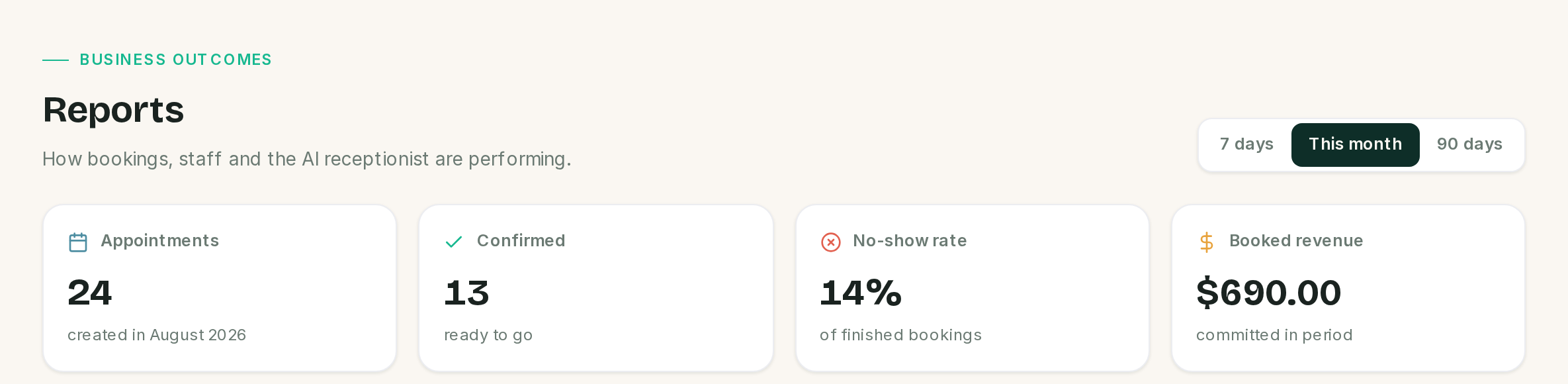 The first card names the rule the other three follow.
⚠️ Everything on this screen counts by when the booking was made, not when it happens. A booking taken in July for a visit in August belongs to July on every card. This is the opposite of the Calendar, and it is the single thing most likely to make two people quote different numbers at each other.
| Card | Counts |
|---|---|
| Appointments | Every booking created in the period, whatever its status and whoever made it |
| Confirmed | Those now sitting at Confirmed |
| No-show rate | No-shows as a share of bookings that reached their slot, so completed plus no-show, and nothing else |
| Booked revenue | The price of every Confirmed, Completed and Awaiting deposit booking |
⚠️ Booked revenue is committed, not collected. It is what the bookings are worth, including deposits nobody has paid yet. Money that actually arrived is on Payments.
The two breakdowns
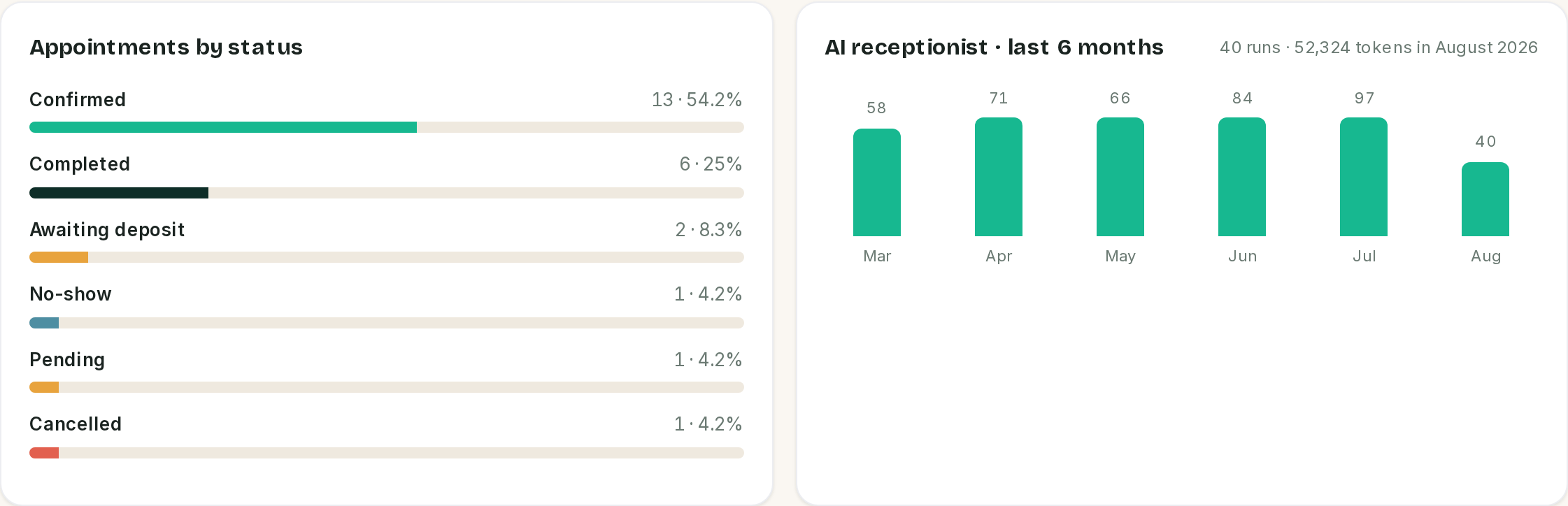 The bars are always six months. The line beside the title follows the range.
Appointments by status is a share of the period's bookings, largest first, and it includes cancellations and no-shows.
Busiest staff and Top services count only Confirmed, Completed and Awaiting deposit, so their totals are deliberately smaller than the status chart above them. A booking with nobody assigned groups under a dash rather than being dropped.
AI receptionist is two measurements in one card, and it says so: the six bars are always the last six calendar months and ignore the range selector, while the run and token figures next to the title follow the range you picked.
What is not on this screen
- No export. There is no CSV or PDF of a report in this release. What is on screen is what you have.
- No revenue per customer, and no customer ranking of any kind.
- No cost. What the receptionist costs to run is on Notifications → Cost dashboard, which is a separate screen with its own period.
- Nothing for a single staff member to see about themselves. Reports is Admin and Owner only.
If something went wrong
The customers list is in a strange order. It sorts by Last message, which is never filled in. Sort by Customer or by Created.
The same person is in the list twice. Two WhatsApp numbers, two records. There is no merge; delete the one with no history, after checking which one the bookings hang off.
Saving a customer gave me a server error. The number already exists on another record. Search for it.
The Delete button on the customer form does nothing. Known defect. Use the row menu on the list.
A customer says they still get reminders after asking us to stop. Only the customer can opt out, by messaging stop. Nothing in the panel does it for them.
Somebody opted out by accident and wants messages again. There is no way back through the panel in this release.
Deleting a customer changed my reports. It deleted their appointments too. Export before deleting.
Reports and the Calendar disagree about how many bookings there are. Reports counts bookings by the date they were made, the Calendar draws them on the day they happen.
Booked revenue does not match the money in the bank. It is not meant to. It adds up what the bookings are priced at, including deposits nobody has paid. Use Payments for money that moved.
The AI chart shows six months but the range says 7 days. Correct. The bars are fixed at six months; only the figures beside the title follow the range.
Previous: The team inbox Next: Monitoring, AI activity, the guardrail log, failed messages and what it all costs.