The AI receptionist
The receptionist is the part that answers customers. It reads a WhatsApp message, decides what is being asked, and can look up your services, check real availability and make a booking without anyone touching it.
It is off until you give it a key, and how far it is allowed to go is your decision rather than a default.
Before this chapter is useful, WhatsApp Cloud API has to be connected. The receptionist has nothing to answer otherwise.
Bring your own key
Each business enters its own API key, under AI receptionist → Advanced settings. It is stored encrypted.
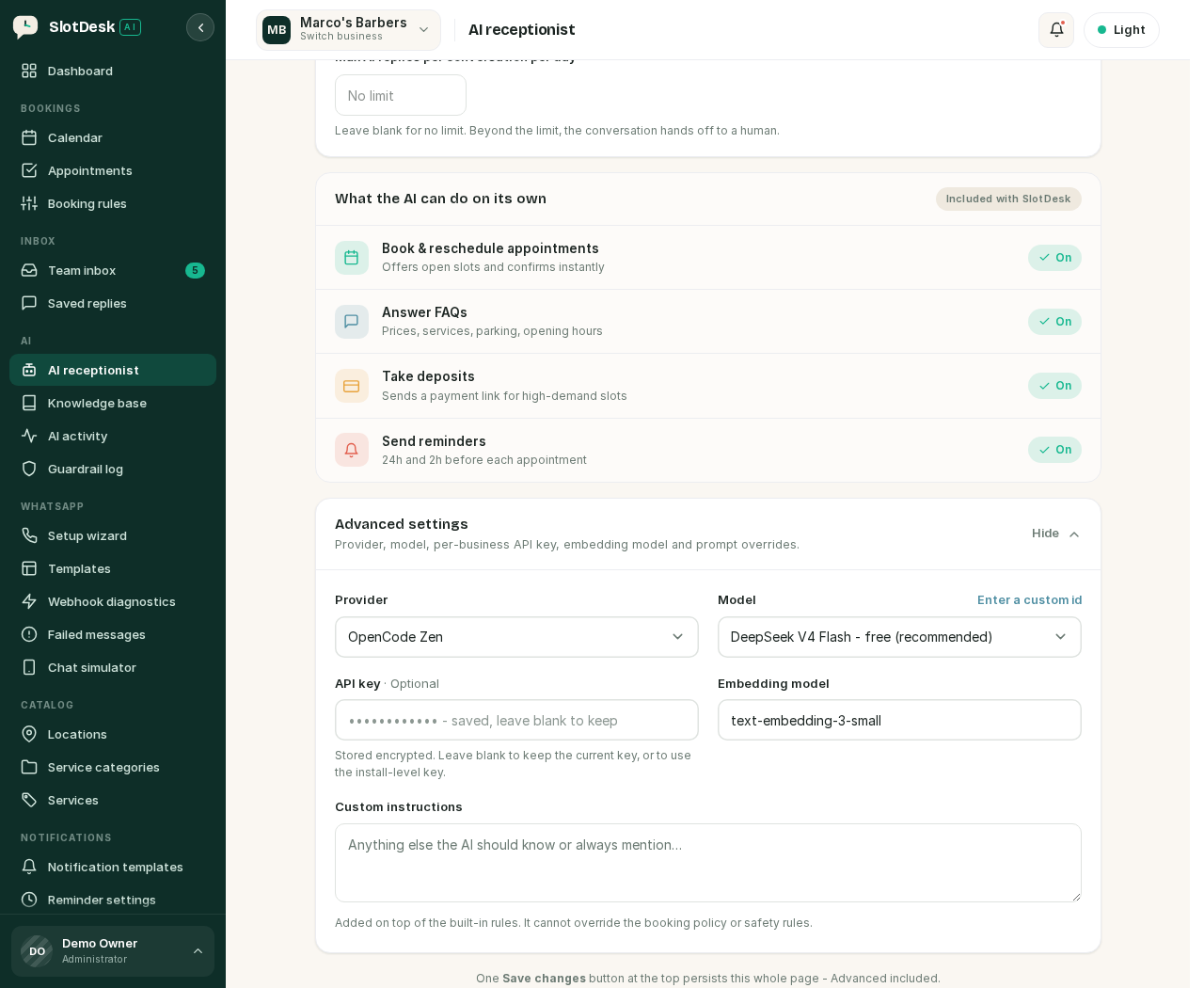 Advanced settings: provider, model, the per-business key, the embedding model and custom instructions.
Everything provider-related lives in this one panel, and it is collapsed by default. There is a single Save changes button at the top of the page that persists the whole page, Advanced included.
There is no shared default. A business with no key of its own is not live, and that is deliberate rather than an oversight: the alternative is one business quietly spending the install owner's API quota. The receptionist needs two things to run at all, and it needs both:
- The toggle switched on.
- A key saved for that business.
You need an account with the provider you choose, and billing set up on their side. SlotDesk does not resell tokens; you pay your provider directly for what the receptionist uses.
Choosing a provider
Six providers ship. Pick one under Advanced settings → Provider.
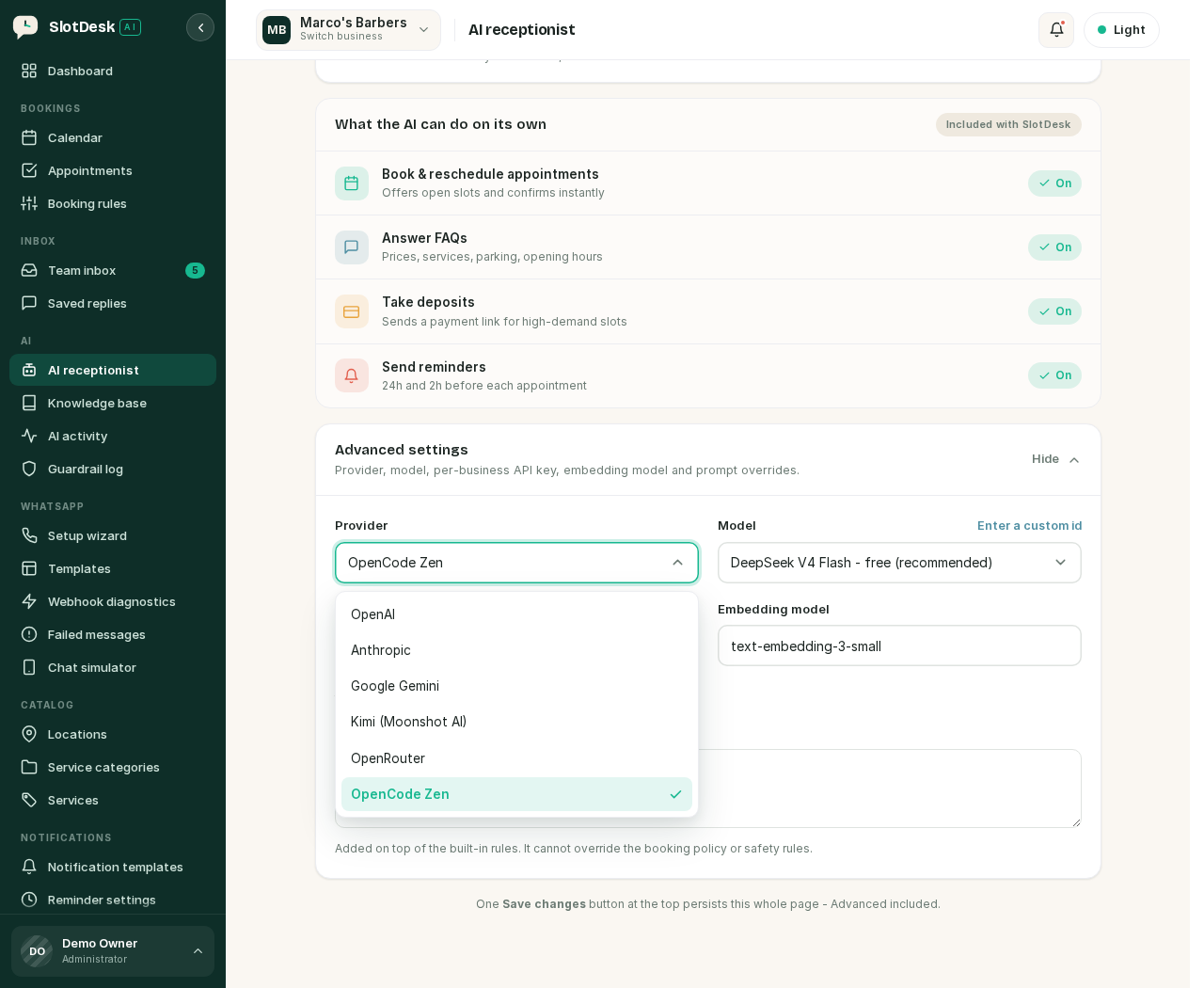 The provider list.
| Provider | What it is |
|---|---|
| OpenAI | Direct |
| Anthropic | Direct |
| Google Gemini | Direct |
| Kimi (Moonshot AI) | Direct. Mainland-China accounts use a different base URL |
| OpenRouter | A gateway in front of hundreds of models |
| OpenCode Zen | A gateway with a free tier that needs no card |
The models each one offers
Choosing a provider reloads the model list. Every model below is tool-capable, which the receptionist requires.
| Provider | Models |
|---|---|
| OpenAI | gpt-4o-mini fast and cheap · gpt-4o higher quality, costs more |
| Anthropic | claude-haiku-4-5 fast and cheap · claude-sonnet-5 balanced · claude-opus-5 most capable, slowest |
| Google Gemini | gemini-2.0-flash fast |
| Kimi | kimi-k3 newest · kimi-k2.6 |
| OpenRouter | openai/gpt-4o-mini · anthropic/claude-haiku-4.5 · google/gemini-2.0-flash-001, plus any other id via Enter a custom id |
| OpenCode Zen | Free, no card: deepseek-v4-flash-free, big-pickle, mimo-v2.5-free, ling-3.0-flash-free, nemotron-3-ultra-free. With Zen billing: claude-haiku-4.5, claude-sonnet-5, gpt-5.4-mini, gemini-3.5-flash |
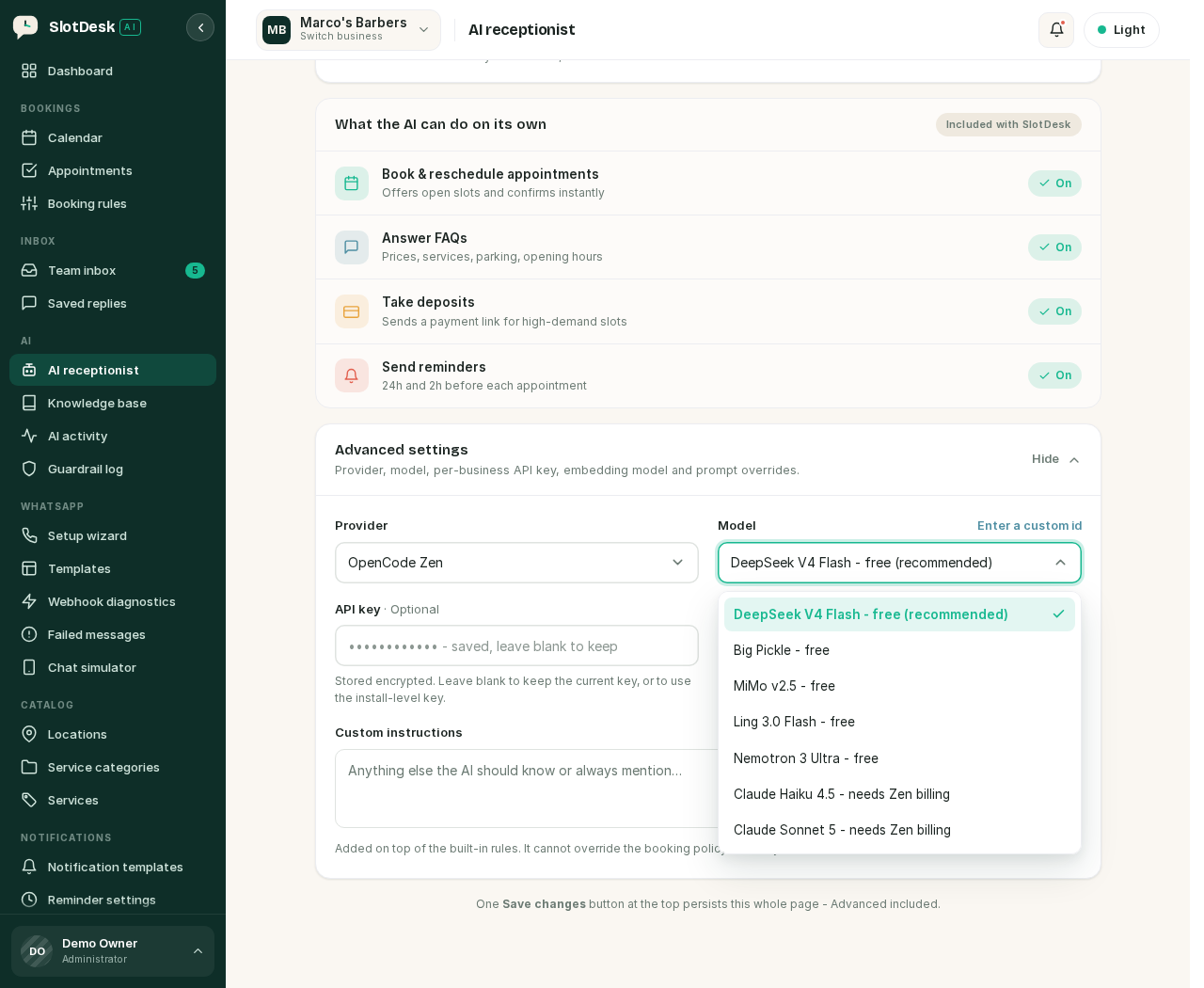 Anthropic selected, with its models.
Read the labels in the app rather than this table when they disagree. The dropdown is generated from your install's own configuration, so it tracks new model releases and this page does not. The "recommended" marker against one model per provider is the app's own suggestion.
If none of the listed ids suit you, Enter a custom id accepts any model string the provider accepts. That is the escape hatch for OpenRouter in particular, which proxies far more models than the list shows.
Two practical notes:
- Any model you pick has to support tool calling. The receptionist works by calling functions, not by generating text alone. A model without tools can chat and cannot book.
- Anthropic, Kimi and OpenCode Zen have no embeddings endpoint, so knowledge-base retrieval falls back to OpenAI-style embeddings, which matters if you rely on the knowledge base.
Switching provider also resets the model and the embedding model to that provider's defaults, and clears the saved API key, since a key for one provider is no use to another.
If you want to test a provider before committing, php artisan ai:doctor checks every configured
one live: authentication, tool calling, and the multi-turn tool replay. Add --provider= to check
just one.
How far it is allowed to go
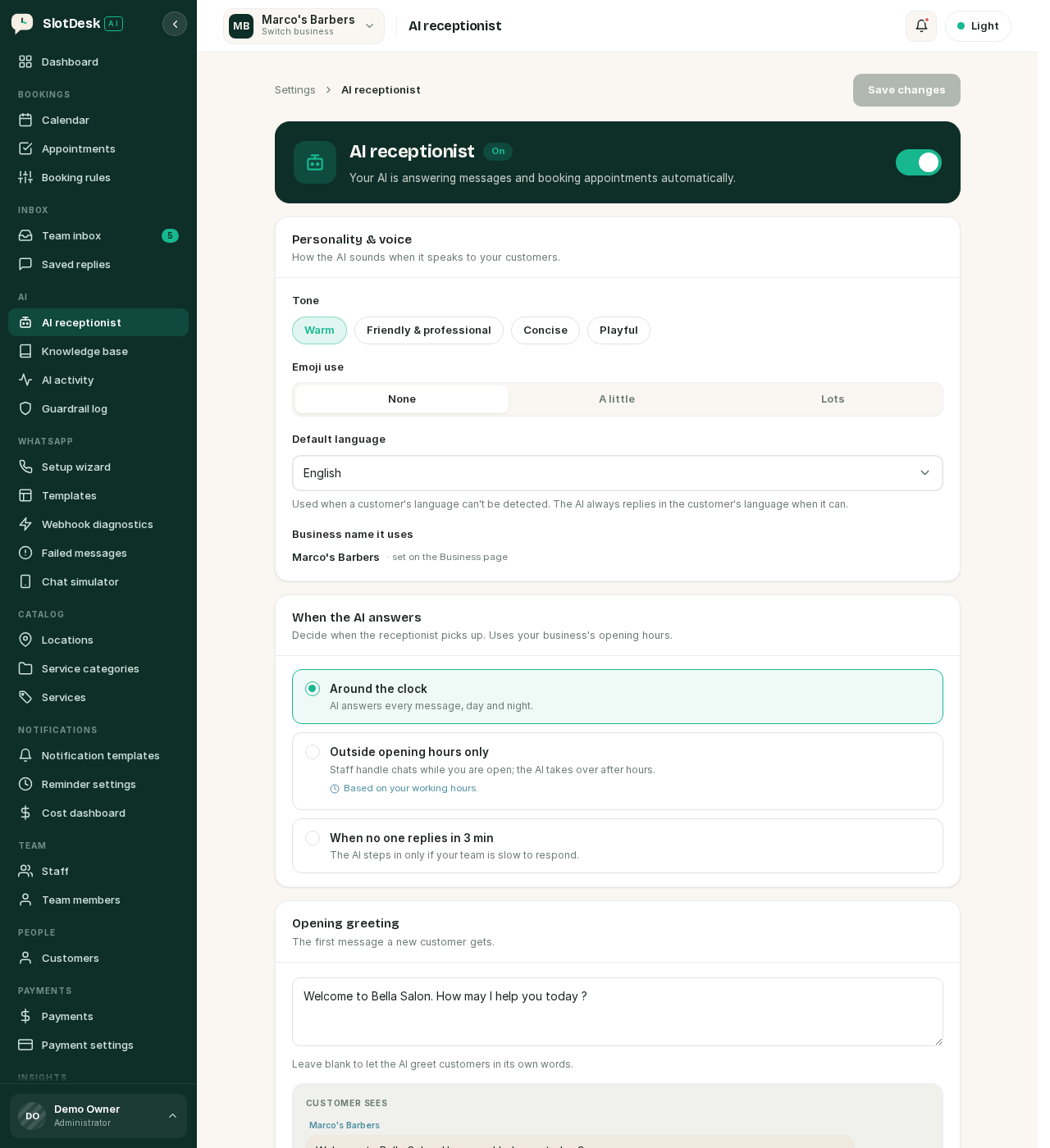 Personality, and when the receptionist picks up.
Reply mode
The single most important setting on the page. Three levels, in increasing order of trust:
| Mode | What happens |
|---|---|
| Draft only | The AI writes replies and your team approves each one before it sends |
| Auto-reply | The AI sends replies itself, but a new booking still waits for your confirmation |
| Auto-book & confirm | Fully hands-free. The AI replies and completes bookings on its own |
Start on Draft only. You get to read what it would have said, in your own inbox, with no risk, and you will learn more about whether it understands your business in a day of drafts than in any amount of configuration.
When it answers
| Option | For |
|---|---|
| Around the clock | The AI answers every message, day and night |
| Outside opening hours only | Your team handles chats while you are open; the AI picks up after hours. Uses your working hours |
| When no one replies in 3 min | The AI only steps in if your team is slow |
Personality
Tone, emoji use and a default language. The default language is only used when the customer's own language cannot be detected; the receptionist replies in the customer's language when it can work it out.
The opening greeting is the first message a new customer gets. Leave it blank and the AI greets them in its own words.
What it can do on its own
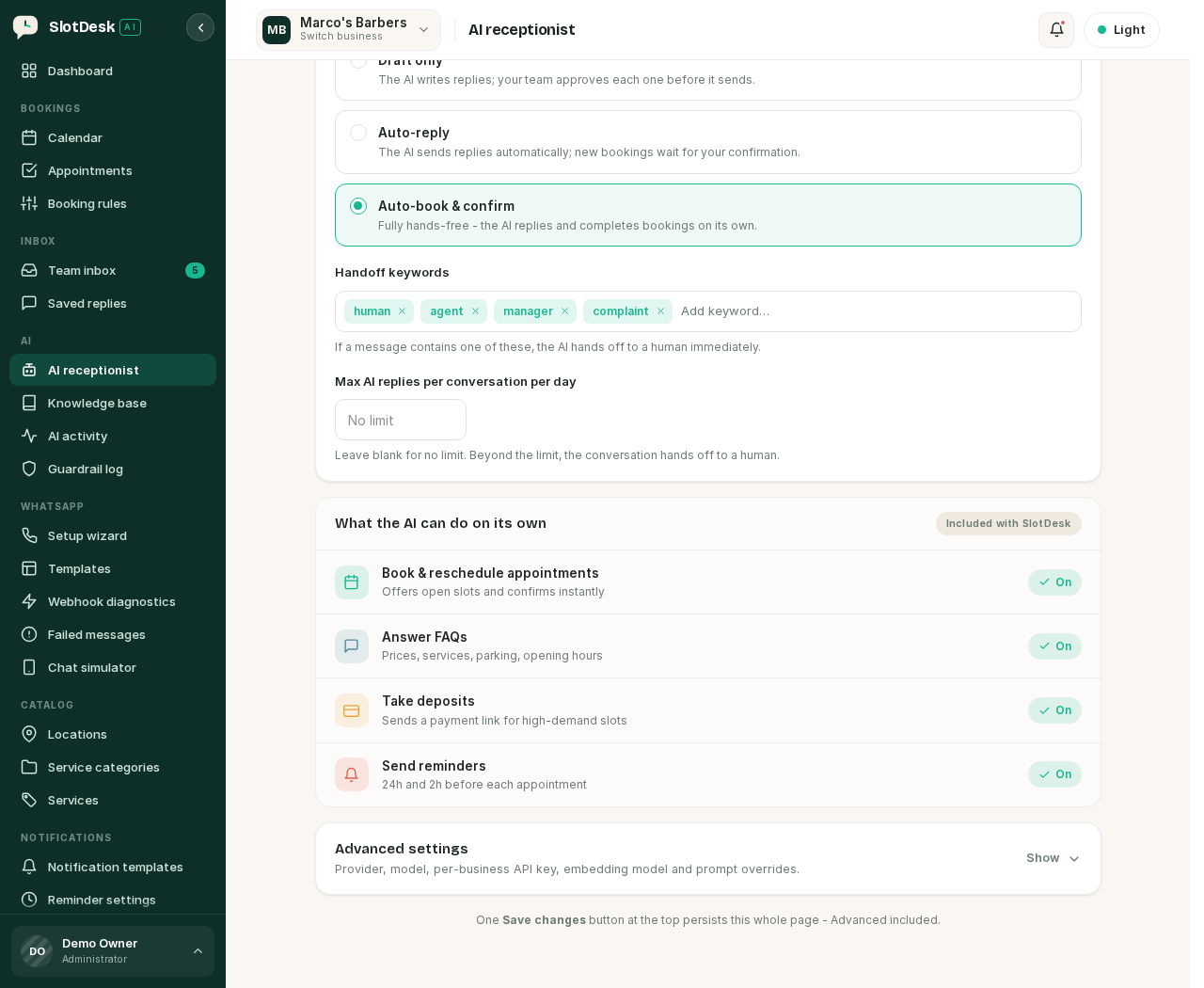 Reply mode, handoff keywords and the daily cap, under Autonomy and handoff.
The receptionist works through tools rather than by writing text and hoping. Each is a real function against your live data:
| It can | Tools behind it |
|---|---|
| Look things up | get_services, get_staff, get_business_hours, get_my_bookings |
| Offer real times | check_availability, hold_slot |
| Change the calendar | create_booking, reschedule_booking, cancel_booking |
| Take money | create_payment_link |
| Give up | handoff_to_human |
Because these read your actual catalog and calendar, the receptionist cannot invent a service you do not offer or a slot that is already taken. It is limited to 6 tool calls per reply, which stops a confused model looping, and it sees the last 12 messages of the conversation for context.
When the AI offers a time it can place a short hold on it with hold_slot, so the slot is not taken
by someone else while the customer is deciding.
Handing off to a human
Three things end the AI's turn and pass the conversation to your team.
Handoff keywords. If a message contains one, the AI stops immediately. The defaults are human,
agent, manager and complaint, and you can add your own. Anyone typing "I want to speak to a
manager" reaches one.
A daily cap. Max AI replies per conversation per day is blank by default, meaning no limit. Set a number and the conversation hands off once it is reached. This is a useful backstop against a loop with a confused customer.
Failure. If the model call fails, SlotDesk hands the customer to a human rather than leaving them with silence. It retries a few times first with a widening pause, so a single blip does not end a conversation, and an install-wide fallback provider can be configured to cover one provider being down entirely.
Custom instructions
Free text, added on top of the built-in rules. Good for the things that are true of your business and nowhere else: parking, which entrance to use, that you cannot take under-16s without a guardian.
It is added to the rules, not layered over them. Custom instructions cannot override the booking policy or the safety rules, so you cannot instruct the receptionist to double-book, ignore a cancellation window, or promise something the calendar will not honour.
Watching what it costs
Two screens to check in the first week:
- AI activity lists each run: what the customer asked, which tools were called and what came back. This is where you look when a reply was wrong, because it shows the reasoning rather than just the outcome.
- Cost dashboard totals what the receptionist has spent over 7 days, the month, or 90 days.
Cost is driven by how much conversation the model reads, not by how many bookings it makes, so a cheap model on a busy number can still cost more than an expensive one on a quiet one. The free tier on OpenCode Zen exists precisely so you can find that out before paying anything.
If something went wrong
The receptionist never replies and the toggle is on. No key saved for this business. Check Advanced settings. The toggle alone does not make it live.
It replies but never books anything.
The model does not support tool calling. Pick one that does, then confirm with
php artisan ai:doctor --provider=<name>.
Replies arrive late or not at all under load. Model calls are queued like everything else. Check the queue worker before blaming the provider.
It answered outside your opening hours when you did not want it to. The answer window is set to Around the clock, or your working hours are not set. It reads the business's working hours.
It says something wrong about your services. Look at AI activity for that run. If the tool returned the wrong data, fix the catalog rather than the prompt. If the tools were right and the wording was wrong, that is custom instructions or the knowledge base.
Every conversation hands off immediately. A handoff keyword is too broad. A common one is adding a word that appears in normal conversation.
It stopped working after being fine. Provider key expired, revoked, or the account ran out of credit. AI activity will show the failed runs.
Previous: Templates and the 24-hour window Next: Guardrails and the knowledge base, keeping it on topic and teaching it about your business.