Before you start
Read this before you buy, not after. SlotDesk AI is self-hosted, which means a few things have to be true about your server and your accounts before it can work. All of them are listed here, and none of them are expensive, but one of them stops the product dead if it is missing.
What SlotDesk AI is
Your customers message your business on WhatsApp. An AI receptionist answers their questions, checks your live availability, books, reschedules and cancels appointments, takes a deposit if you ask for one, and hands the conversation to a human when it should.
It runs on your own server. The application, the database and every conversation stay on hardware you control. There is no account with us and no monthly fee to us.
There are two panels. /app is the day to day one, and each business you run gets its own. /admin
belongs to whoever owns the install and manages businesses, users and the health of the system.
Server requirements
Everything here is checked automatically on the second screen of the installer, so you do not have to audit your server by hand. Fix any row that fails, then re-check.
| Requirement | |
|---|---|
| PHP | 8.3.0 or newer |
| Extensions | pdo_mysql · mbstring · openssl · curl · gd · zip · intl |
| Database | MySQL 8.0+, or MariaDB 10.6+ |
| Web server | Document root pointed at the public/ directory |
| Writable | storage/ and bootstrap/cache/ |
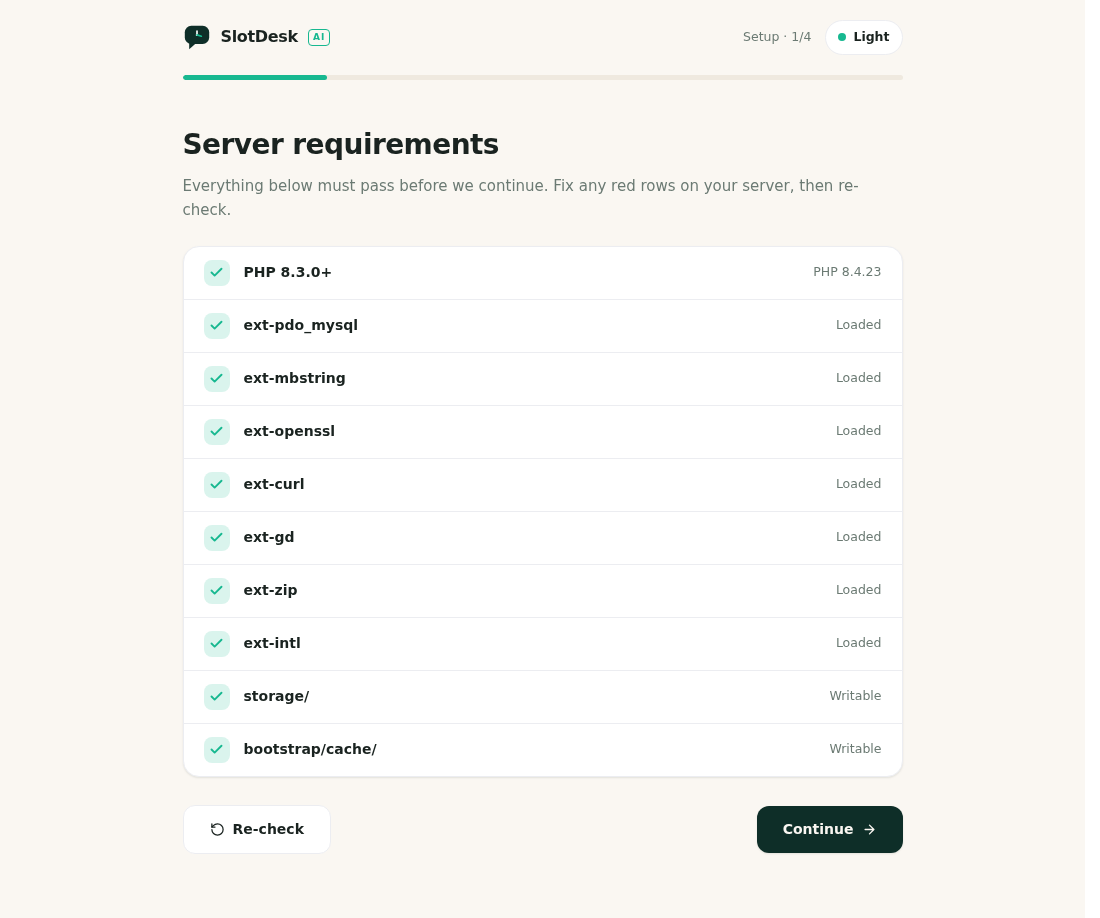 The installer's requirements screen, with every row passing.
This is ordinary LAMP hosting. There is no Redis, no Node runtime and no search service to provision: the job queue runs on your database by default.
The one that stops the product dead
Your host must give you cron access and let you keep a background process running.
SlotDesk does its real work in the background. Reminders, WhatsApp sends and AI replies are all queued rather than done while the page loads. Two things drive that queue:
* * * * * cd /path/to/slotdesk && php artisan schedule:run >> /dev/null 2>&1
php artisan queue:work --tries=3
Without them the application still installs, still logs you in, and still shows you a working dashboard. It will simply never send anything. No reply on WhatsApp, no reminder, no confirmation. Nothing in the interface looks broken, which is why this is so easy to miss.
Before you buy, confirm with your host that you can do both. Cron is standard on cPanel and on any VPS. A permanently running worker is standard on a VPS and varies on shared hosting, so ask specifically about that one. The next chapter, Cron and the queue worker, covers setting both up on cPanel and on a VPS.
What to have ready
Collect these before you open the installer. It asks for most of them.
Required
Your CodeCanyon purchase code. The installer asks for it on the App details screen and uses it to switch the install into production mode. It is in your CodeCanyon downloads, under "License certificate and purchase code".
A domain with HTTPS, resolving to your server.
Not localhost and not an IP address. Meta will only deliver WhatsApp webhooks to a public HTTPS
endpoint with a valid certificate, so a working TLS certificate is a hard requirement rather than
good practice. You will type this address into the installer as the App URL, without a trailing
slash.
A database and its credentials. An empty MySQL database, plus the user, password and host. The installer writes the schema itself.
A WhatsApp Cloud API number. A phone number connected to WhatsApp Cloud API through a Meta business account. It must not already be registered to the regular WhatsApp or WhatsApp Business app, which is the most common thing that goes wrong here. The WhatsApp Cloud API chapter walks through getting one.
An AI provider key. One of OpenAI, Anthropic, Google Gemini, Kimi, OpenRouter or OpenCode Zen. You supply the key and you pay that provider directly for what the receptionist uses. The AI receptionist chapter covers choosing one and what it is likely to cost.
SMTP credentials.
Email is used for password resets and for notifying your team when a conversation is handed over.
Note that mail is set to log until you configure it, which means messages are written to the log
file instead of being delivered, and nothing appears to fail. Set this up during install rather than
discovering it later.
Optional
A Stripe account, if you want to take deposits or full payment at the time of booking. You can run SlotDesk without it and mark payments as received by hand instead. The Payments chapter covers both.
What SlotDesk does not do for you
Written down so nobody finds the line by crossing it.
- It does not get you approved by Meta. Creating the Meta app, verifying your business and getting message templates approved are steps you take with Meta. SlotDesk connects to the result.
- It does not supply AI credit. The provider key is yours and the usage is billed to you.
- It does not administer your server. Cron, the queue worker, TLS certificates, backups and PHP versions are yours. The documentation tells you what is needed and the commands to run.
- It does not install itself on your hosting. The installer is a browser wizard and it is
straightforward, but somebody has to upload the files and point the web server at
public/.
Check yourself before you go on
If you can answer yes to all six, continue to Install.
- My host runs PHP 8.3 or newer with the seven extensions listed above
- I have an empty MySQL 8 database and its credentials
- My domain resolves to this server over HTTPS with a valid certificate
- My host allows cron and a permanently running background process
- I have a phone number that can be connected to WhatsApp Cloud API and is not already on WhatsApp
- I have an AI provider key, or an account where I can make one
If the fourth is a no, stop and resolve it before anything else. Everything downstream depends on it.
Next: Install, the wizard screen by screen.